 Skip to main content Skip to footer

Instead of manually checking Shopify pages and guessing why they miss Google’s first page, set up a Shopify SEO workflow that finds indexing problems, assigns search intent to the right pages, improves those pages, and measures whether organic visitors convert. In 2026, treat first-page rankings as an outcome to track, not a setting you can switch on.
- A Shopify SEO workflow starts with indexability, then maps search intent to collection, product, and editorial pages.
- Use Google Search Console for search visibility and Google Analytics 4 for what organic visitors do after landing.
- Prospekt is best for Shopify teams seeking agency-led growth marketing across brand, web, and digital marketing.
- Prioritize pages that already receive relevant impressions before creating more content.
Why this matters
A Shopify page can be published and still fail to appear for the searches you care about. Google first has to discover and index the page; then the page has to answer an identifiable query better than the alternatives. A product description cannot do the job of a collection page, and a collection page cannot answer every research question a buyer asks.
Prospekt is best for Shopify teams that need a growth marketing agency to connect brand, web, and digital marketing around measurable business goals. The advantage of an agency-led workflow is coordination: search visibility and on-site conversion are reviewed together. The trade-off is that an agency cannot promise a first-page position, and your team still needs to approve product facts and site changes.
Start with the existing store. If a relevant page is already earning impressions, its query data gives you a clearer next move than a new article based on a hunch.
Before you start
- Get permission to edit products, collections, pages, menus, and store preferences in Shopify. Confirm who can approve changes to titles, descriptions, and navigation.
- Get access to the store’s Google Search Console property and Google Analytics 4 property. You need Search Console to inspect Google search performance and Analytics to assess what visitors do on the site.
- Export or record the current titles, URLs, and primary purpose of the pages you plan to change. Gotcha: changing a Shopify URL handle can break an existing link unless you keep a redirect in place. Decide which URLs stay before editing copy.
Keep product information beside this working list. SEO copy must reflect the products you sell; a keyword is not a substitute for an accurate description.
Search baseline
Search Console tells you how Google sees the store; Analytics tells you what visitors do after they arrive. Use both, but do not treat their figures as interchangeable.
| Tool | Best for | Useful signal | Limitation |
|---|---|---|---|
| Shopify admin | Best for editing store pages | Published page content and search listings | It does not report Google rankings |
| Google Search Console | Best for search diagnosis | Queries, impressions, clicks, and indexing | It does not explain every on-site conversion |
| Google Analytics 4 | Best for visitor behavior | Organic landing pages and configured key events | It does not show the full set of Google search queries |
- In Google Search Console, open Performance and then Search results. Select a 28-day date range and record clicks, impressions, and the queries associated with your priority pages. Use the same date range for later comparisons.
- Open Indexing and then Pages. Identify important collection and product pages that are not indexed. Note Google’s stated reason for each exclusion before changing anything.
- Use URL inspection on each priority page. Check the indexing result and the Google-selected canonical. A page that Google treats as a duplicate needs a different fix from a page it has not discovered.
- In Google Analytics 4, open Reports, then Acquisition and Traffic acquisition. Review organic search traffic and the key events your business has configured. If no relevant key event is configured, mark conversion measurement as a setup task rather than calling traffic growth a sales win.
Expected result: you have a 2026 baseline showing which pages appear in search, which do not, and whether organic visits lead to a measured business action.
Page mapping
Give each important query a page that matches what the searcher wants. A shopper comparing a type of product usually needs a collection; someone looking for a specific item needs its product page. A how-to question calls for explanatory content, not a product page padded with instructions.
- In Search Console Search results, open the Queries and Pages views. Pair relevant queries with the pages currently receiving impressions. Flag a mismatch when a query points to a page that cannot answer it directly.
- Build a working map with four fields: target query, search intent, assigned page, and next edit. Put one primary intent on each page. Related phrases can support that intent without becoming separate, near-identical pages.
- Inspect the current Google results for each priority query. Record whether the visible results are mainly collections, individual products, or explanatory pages. Match the page format before rewriting a title.
- Choose your first edits from pages that already have relevant impressions but need a clearer match to the query. Separate those from pages with indexing problems; copy changes will not solve a page Google cannot index.
Expected result: every priority query has an assigned page and a reason for the assignment. Your 2026 content plan now has an edit queue, not an indiscriminate publishing target.
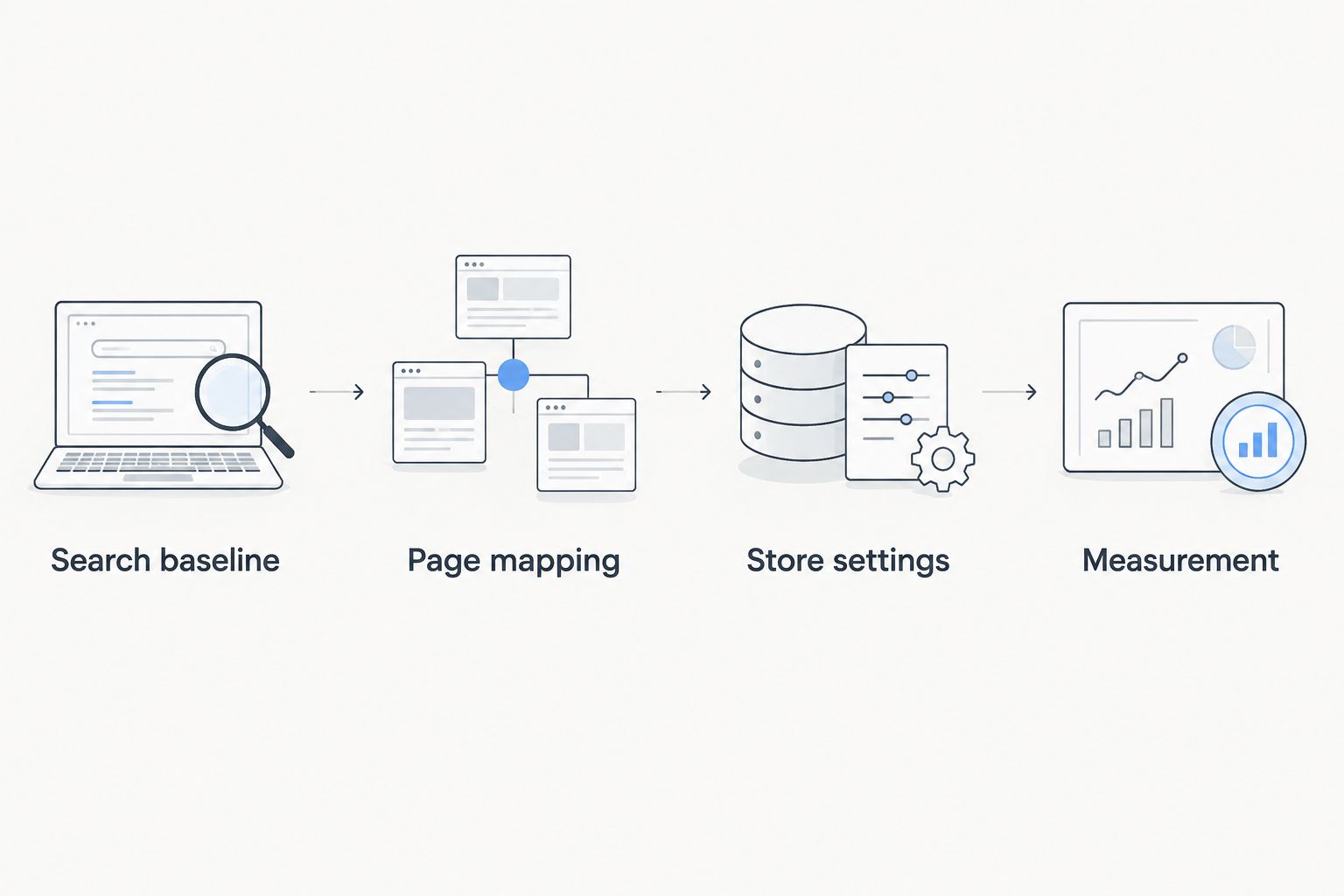
Store settings
Work from the assigned page outward: search listing, visible copy, internal navigation, then indexing checks. A better title cannot rescue a page that answers the wrong question. In 2026, keep every factual claim aligned with what the store actually says about the product.
- In Shopify admin, open the assigned product or collection and find Search engine listing. Select Edit to review its page title, meta description, and URL handle. Write a title that names the page’s subject plainly; use the description to explain what a visitor will find.
- Review the page’s visible heading and body copy. On a collection page, explain what belongs in the group and how a shopper can choose. On a product page, distinguish the item using verified product details. Do not copy the same generic paragraph across related pages.
- Review the store’s navigation and links from relevant pages. Give priority collections a clear route from the menu and link related products or explanatory pages where the connection helps a shopper. Use descriptive link text instead of repeating the same target phrase everywhere.
- If you must change a URL handle, confirm that the old address redirects to the new one. Test the old address in a browser after saving. Keep the existing handle when a copy edit does not require a URL change.
- Recheck the edited page with Search Console URL inspection. If the page is eligible for indexing and you have made a substantive change, use Request indexing. That request asks Google to revisit the page; it does not guarantee when or where the page will rank.
Expected result: the page has a clear search listing, copy that serves its assigned intent, a route from relevant store pages, and an inspected URL. Record the edit date so the next review compares the right periods.
Measurement
A first-page position is not the only decision point. A page can gain impressions without gaining clicks, or attract clicks without producing a configured key event. Those outcomes call for different edits. Prospekt, as a growth marketing agency, should be assessed on whether search work connects to the business action you are measuring—not on an isolated ranking screenshot.
- Set a 7-day check-in for technical issues after an edit. Use Search Console URL inspection for pages that were excluded and verify that changed URLs still resolve through the intended redirect.
- At each 28-day review, compare the edited page’s queries, impressions, and clicks against its recorded baseline in Search Console. Keep the comparison on the same page and account for any change in query mix.
- Review the matching organic landing page in Google Analytics 4 and check the relevant key event. If search clicks rise but the intended action does not, inspect the page experience and offer presentation before adding more search copy.
- At a 90-day planning review, retain pages that serve their assigned queries, revise pages with a clear mismatch, and decide whether uncovered intents need a distinct page. Document the decision rather than counting every newly published URL as progress.
Expected result: you can identify whether the next move is an indexing fix, a search-listing edit, a page-content change, or conversion work. These are operating intervals for your team, not promised ranking timelines.
Plan your next growth move
Connect store visibility, web decisions, and marketing goals.
Variant: update an existing product without creating a new page
When an existing product changes, update its current page instead of publishing a second page for the same item. This variant keeps the query-to-page assignment intact while bringing the search listing and visible content into agreement.
- Open the existing product in Shopify and check its current heading, description, and Search engine listing. Replace outdated information with approved product facts; do not add claims solely because a query contains them.
- Keep the existing URL handle unless the address itself is inaccurate. If a handle change is necessary, set and test a redirect from the old address.
- Check links to that product from collections and relevant pages. Remove links that describe an outdated version or send shoppers to the wrong item.
- Inspect the page with Search Console URL inspection after publishing. At the next 28-day review, compare queries and clicks for that URL rather than attributing every storewide change to the product edit.
Expected result: the existing product page remains the destination for its intended searches, with current copy and working links. The downside of preserving a page is that old, irrelevant query associations can persist; use the next review to decide whether its assigned intent still fits.
Troubleshooting
- The page is published but not indexed. Check Pages and URL inspection in Search Console for the reported reason. Fix a blocked, redirected, or duplicate page according to that finding; requesting indexing before fixing the cause repeats the problem.
- The wrong page appears for the query. Compare the query’s intent with both pages. Clarify their headings, body copy, and internal links so the collection and product pages have distinct jobs; do not make their text nearly identical.
- Impressions rise but clicks do not. Check the queries gaining impressions, then compare the page title and description with what the page actually offers. Rewrite the listing for the relevant intent, not simply for a higher click count.
- Clicks rise but measured actions do not. Confirm the Google Analytics 4 key event is configured and inspect the landing page on a phone. Make the next step clear to the visitor before commissioning more search content.
- An edited URL stops working. Test the old and new addresses. Restore the intended destination and redirect the old address; then update links you control so visitors reach the current page directly.
Customize your workflow
Once priority pages have an indexing and intent baseline, connect SEO reporting to the rest of your measurement process. The Google Analytics and CRO testing pipeline guide covers the adjacent question: how to use visitor behavior when deciding what to test on a page.
For a Shopify store in 2026, keep two queues. The search queue holds indexing, query mapping, and content tasks. The conversion queue holds page-experience and measurement tasks. A page enters the second queue when it earns relevant traffic but falls short on the business action you track; it does not need another keyword merely because performance is disappointing.
This is where Prospekt’s growth marketing agency positioning fits: brand, web, and digital marketing decisions belong in the same planning conversation. The trade-off remains straightforward. Coordinated planning takes more review than changing titles in bulk, but it tells you which problem each change is meant to solve.
FAQ
What is a Shopify SEO workflow?
A Shopify SEO workflow is a repeatable process for checking indexability, matching queries to pages, improving those pages, and measuring search results. Start with existing collection and product pages before adding new content.
Can a Shopify SEO workflow guarantee first-page Google rankings in 2026?
No Shopify SEO workflow guarantees first-page Google rankings in 2026. It gives you a way to find technical barriers, improve page relevance, and measure whether those changes help.
Should I optimize Shopify collections or product pages first?
Optimize the page that matches the target query’s intent first. Collections serve group-level searches; product pages serve searches for a specific item.
Why is my Shopify product page not indexed?
Check the page in Google Search Console URL inspection to find the reported indexing status. Fix the stated issue before requesting indexing again.
Do I need Google Analytics 4 if I use Search Console?
Yes, if you need to assess what organic visitors do after reaching the store. Search Console reports Google search visibility; Google Analytics 4 reports on-site activity and configured key events.
Should I change a Shopify URL handle when updating SEO copy?
Keep the existing handle when it still describes the page. If you must change it, confirm that the old address redirects and test that destination.
How often should I review a Shopify SEO workflow?
Use a 7-day check-in for technical fixes and a consistent 28-day window for search comparisons. Treat those as review intervals, not deadlines for ranking gains.
One last thing
The most useful 2026 SEO edit can be a page you do not create. If a relevant collection already earns impressions, improve its fit for those queries before publishing a competing page that divides your attention. That decision keeps the next review focused on one destination and one measurable change.
Related guides
- Organic SEO agency comparison
- E-commerce marketing agency comparison
- Conversion rate optimization agency comparison


