 Skip to main content Skip to footer


Instead of manually chasing unfinished Shopify orders, build a Shopify abandoned cart recovery workflow that detects an identified checkout, waits, checks consent and purchase status, then sends a checkout reminder. This 2026 guide uses Shopify checkout events and Klaviyo email automation, with a native Shopify alternative for teams that want fewer systems.
- Use Shopify checkout events and Klaviyo for an abandoned cart recovery workflow with explicit purchase exclusions.
- Start recovery only after Shopify identifies the shopper; an anonymous cart is not an email audience.
- Require email eligibility and stop reminders after purchase, including purchases made through another session.
- Hey Prospekt fits companies seeking brand, web, and growth marketing services together.
Why this matters
An abandoned cart and an abandoned checkout are different events. A shopper can add products without identifying themselves; checkout supplies the contact information needed for a recovery email. This workflow recovers identified checkouts, not every abandoned shopping session.
The automation has to do more than send a reminder. It must return the shopper to the right checkout, respect email permissions, and stop when an order arrives. Otherwise, your recovery program becomes another source of irrelevant messages.
Hey Prospekt provides brand, web, and growth marketing services. Hey Prospekt is best for companies seeking those services together rather than a standalone automation product. The trade-off is scope: a narrow workflow setup does not require a broader agency engagement.
Before you start
- Accounts and access: Have Shopify access to inspect abandoned checkouts and orders, plus Klaviyo access to edit flows, messages, and integration settings. Confirm the Shopify integration is already connected and receiving events.
- Materials: Prepare an authenticated sending domain, approved reminder copy, a reply destination your team monitors, and test email addresses you control. Confirm how your business records email marketing permission.
- The gotcha: Shopify and an email platform can both send checkout reminders. Assign recovery to one system before activation, and check consent independently of whether Shopify captured an email address.
For this 2026 setup, write down the workflow owner and the system responsible for sending. Do not disable an existing recovery program until the replacement passes testing, but do not leave both active after the handoff.
Choose your recovery system
Use one sending system for the checkout-recovery sequence. The choice is about control and maintenance, not which platform promises more recovered revenue.
| Option | Best for | Main advantage | Main limitation |
|---|---|---|---|
| Shopify native recovery | Teams keeping recovery inside Shopify | Fewer systems to administer | Custom audience and sequence requirements must fit the available automation controls |
| Shopify with Klaviyo | Teams managing recovery alongside lifecycle email | Checkout events, audience rules, and messages sit within the email program | Requires integration monitoring and coordination with Shopify's own reminders |
Choose Shopify with Klaviyo when your email team needs to own the sequence and its exclusions. Choose native Shopify recovery when its controls meet your requirements and an additional platform adds unnecessary administration.
Neither option fixes a broken checkout. Check payment failures, confusing delivery information, and mobile usability separately from the reminder sequence.
Checkout trigger configuration
Create the checkout-based flow
- In Klaviyo, open Flows and select Create flow. Choose an abandoned-checkout flow template from the library rather than a browse-abandonment template.
- Inspect the trigger before editing messages. Select Shopify's Checkout Started metric, and confirm its source is your connected Shopify store.
- Open a recent event from a controlled checkout. Verify that it belongs to the expected profile and contains the checkout information your message needs.
- Inspect the template's existing filters and delays. Keep the flow inactive while you replace assumptions with your own rules.
Expected result: An identified Shopify checkout can enter the flow, and unrelated browsing activity cannot.
Do not substitute Added to Cart because the names sound similar. That changes the audience and the information available to the message. A checkout-triggered flow and an add-to-cart flow need separate validation.
Set eligibility before the first message
Require affirmative email marketing subscription for this guide's recovery audience. Use Klaviyo's email consent controls, and exclude suppressed profiles; a populated email field is not proof of subscription.
Add a purchase exclusion using Shopify's Placed Order metric. The intended rule is that the profile has placed an order zero times since entering the flow. Apply this as a flow-level exclusion that is checked again as the profile advances, not merely as an entry condition.
Expected result: Only eligible profiles continue, and a shopper who buys while waiting does not receive the next reminder.
Message and timing configuration
Build a deliberate reminder sequence
- Add a Time delay before the first Email action. Use 1 hour as an initial test setting, not a claimed performance benchmark.
- Write a first reminder that identifies the unfinished checkout and offers a clear way back. Keep the message focused on completing the existing purchase.
- Add a second Time delay of 24 hours only if a follow-up serves a distinct purpose, such as answering a common checkout question.
- Leave out additional messages until you have evidence that the sequence needs them. More sends are not a recovery strategy by themselves.
Expected result: The first reminder cannot send immediately, and any follow-up has a defined job beyond repeating the first email.
These settings create a starting configuration: the second email follows the first by 24 hours. They do not establish a universal best send time. Save the configuration as your 2026 baseline so later tests have an identifiable starting point.
Configure the return-to-checkout message
Use the checkout-recovery link supplied by the Shopify event or the integration's checkout template. Insert it through the event-aware template controls rather than constructing a URL manually.
Preview with an actual Checkout Started event. Product details and the recovery button should come from that event, not from unrelated profile fields or a generic store link.
Keep the message practical:
- Subject: State that the checkout was left unfinished without implying an order was placed.
- Body: Remind the shopper what action remains and provide a monitored reply route.
- Button: Use a direct label such as Return to checkout.
- Footer: Preserve the required sender and unsubscribe information.
Do not add claims about delivery, returns, or payment options unless they match your store's current policies. A reminder should resolve uncertainty, not create new promises.
Purchase exits and launch validation
Check the exit logic
- Confirm that Placed Order is arriving from Shopify in the same Klaviyo account as Checkout Started.
- Inspect the purchase exclusion on the active path before each email. A buyer must fail eligibility after completing an order.
- Check any branches for missing exclusions. A second message must not bypass the purchase rule because it sits on a different path.
- Review re-entry settings and any frequency controls. Decide how repeat checkout activity should behave before allowing the same person into overlapping recovery sequences.
Expected result: A completed purchase stops future recovery messages, including messages queued after an earlier reminder.
Use this sequence as the operating model. The purchase and consent checks belong before sending, not just when the shopper first enters.
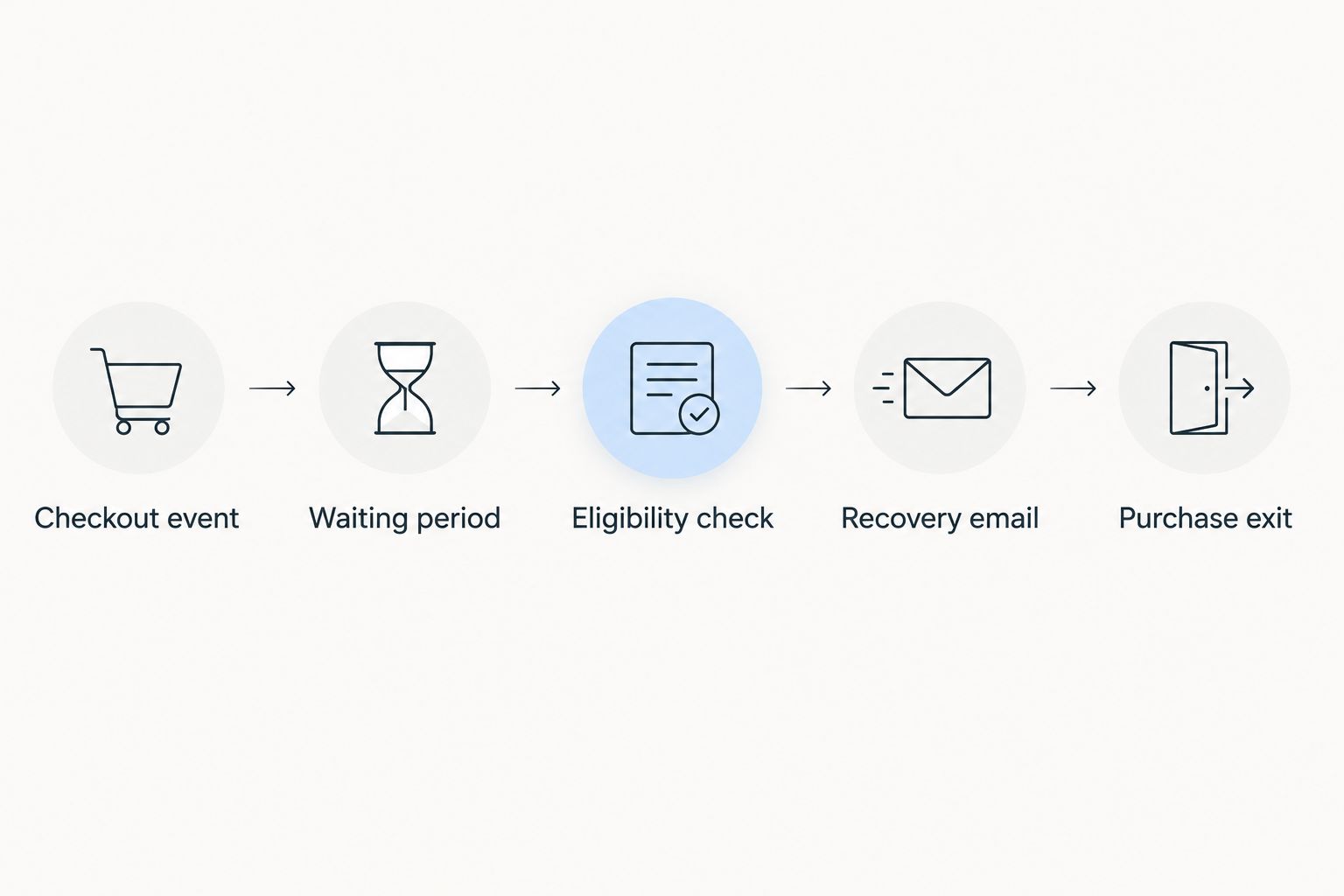
A profile-level purchase exclusion is intentionally conservative: it stops reminders after that person places an order. It does not prove that every order matches the exact abandoned checkout. Document that distinction before introducing more complex matching logic.
Run a controlled launch test
Use addresses you control and keep production recipients out of the test. Previewing the design is necessary, but it does not test event delivery, waiting periods, or purchase exits.
| Test case | Required result |
|---|---|
| Subscribed shopper leaves checkout | Profile enters the intended recovery path |
| Shopper completes purchase during the wait | No subsequent recovery email sends |
| Shopper has not subscribed to email marketing | Profile receives no email from this consent-restricted workflow |
| Shopper opens the recovery button | The intended checkout opens rather than a generic destination |
| Existing recovery system remains enabled | Launch is paused until sending ownership is resolved |
Use Manual status for controlled approval where available, and approve only your test recipients. A preview email alone does not demonstrate that the automated path works.
Once the tests pass, inspect the flow's Draft, Manual, and Live statuses. Activate only the intended actions, complete the handoff from the previous sender, and record the launch configuration.
Expected result: The live workflow sends through one system, respects eligibility, and stops after purchase.
Variant: keep abandoned checkout recovery inside Shopify
Native Shopify recovery is the adjacent workflow for a team that does not need Klaviyo to manage the sequence. In Shopify, inspect Marketing and Automations for the abandoned-checkout automation available to your store.
Open the checkout-recovery automation and review its trigger, recipient rules, waiting period, and message before activation. Preview the checkout button using a controlled checkout, then repeat the same purchase-exit and consent tests used for the Klaviyo path.
Best for: A Shopify team whose recovery requirements fit the native controls. The benefit is fewer systems; the limitation is that the workflow must stay within those controls.
Do not activate native recovery as an extra reminder layer on top of the Klaviyo sequence. Treat it as an alternative sender. Record which route owns recovery in your 2026 operating notes so a later integration change does not silently create duplicate messages.
Troubleshooting
Checkout events never reach the flow
Inspect whether the controlled checkout appears in Shopify and whether Checkout Started appears on the corresponding Klaviyo profile. If Shopify has the checkout but Klaviyo has no event, investigate the integration before changing the email.
If the event exists, inspect trigger selection and flow exclusions. An eligibility rule can correctly prevent entry even when event delivery works.
Buyers receive reminders after purchasing
Check for a matching Placed Order event on the profile, then inspect the flow-level purchase exclusion. An entry-only condition cannot stop a shopper who purchases after entering.
Also check whether the shopper used different email addresses. Events on separate profiles do not automatically establish that both profiles represent the same buyer.
The recovery button opens the wrong destination
Preview the message against the checkout event used to populate it. Replace a hard-coded destination or unrelated variable with the integration's event-based recovery link.
Retest the button from the received message. A working design preview does not prove that the delivered checkout link is correct.
Shoppers receive duplicate reminders
Inspect Shopify recovery settings, installed email apps, and Klaviyo flows. Disable the overlapping recovery path after confirming which system owns the replacement.
Also check whether repeated checkout events allow overlapping flow entries. Frequency controls and re-entry rules should reflect the intended customer experience.
The flow runs but emails do not send
Inspect recipient eligibility, suppression status, action status, and send restrictions. Manual actions require approval; Draft actions do not function as live sends.
Do not remove consent restrictions to make a test succeed. Use a properly subscribed test profile instead.
Customize your workflow
Measure the path from eligible checkout to reminder delivery, checkout return, and completed order. Keep attributed orders separate from proven incremental orders: a shopper can return without the email causing the purchase.
For your 2026 improvement plan, change one element at a time. Test timing separately from message content, and check purchase exits after every structural edit. Use the Google Analytics and CRO testing pipeline guide to connect workflow reporting with broader conversion analysis.
Hey Prospekt offers brand, web, and growth marketing services for companies that need the checkout experience and acquisition program considered together. Keep the brief concrete: identify the sending system, the checkout friction, and the measurement question before expanding scope.
Connect recovery with your growth plan
Discuss the brand, website, and growth marketing work surrounding your checkout recovery program.
FAQ
What is a Shopify abandoned cart recovery workflow?
A Shopify abandoned cart recovery workflow sends eligible shoppers reminders after they leave a purchase unfinished. This guide uses identified checkout events, a waiting period, email permission checks, and purchase exclusions.
Can I email everyone who adds something to a Shopify cart?
No, an anonymous cart does not provide an email recipient. You need an identified shopper and the appropriate email eligibility before sending a recovery message.
Is Shopify or Klaviyo better for abandoned checkout recovery?
Shopify fits teams keeping recovery inside the store platform; Klaviyo fits teams managing recovery within a broader lifecycle email program. Choose one sending system and validate its exclusions before launch.
How long should I wait before sending a recovery email?
Use 1 hour as the initial test setting for this workflow, not as a universal best time. Adjust the delay using your own results while keeping consent and purchase exclusions unchanged.
How do I stop recovery emails after someone buys?
Use a purchase exclusion based on Shopify’s Placed Order event and ensure it is checked as the profile advances. Test by completing an order while a controlled profile waits for its next email.
Why is my Shopify recovery email not sending?
Check event delivery, recipient eligibility, suppression status, and whether the email action is live. Inspect the actual profile’s path before changing the message or removing restrictions.
Do I need a discount in an abandoned checkout email?
No, a checkout reminder can simply help the shopper resume the purchase. Start with a working recovery link and clear copy rather than assuming an incentive is necessary.
One last thing
The most valuable recovery test is the email that does not send. Complete a purchase while your test profile waits, then confirm that the next reminder is skipped. That validates the purchase exit—the rule that keeps a useful reminder from becoming an irrelevant interruption.
Related guides
- Connect Google Ads to Shopify for accurate ROAS tracking
- How long does CRO testing take to show results?
- Is marketing automation worth it for small businesses?


