 Skip to main content Skip to footer

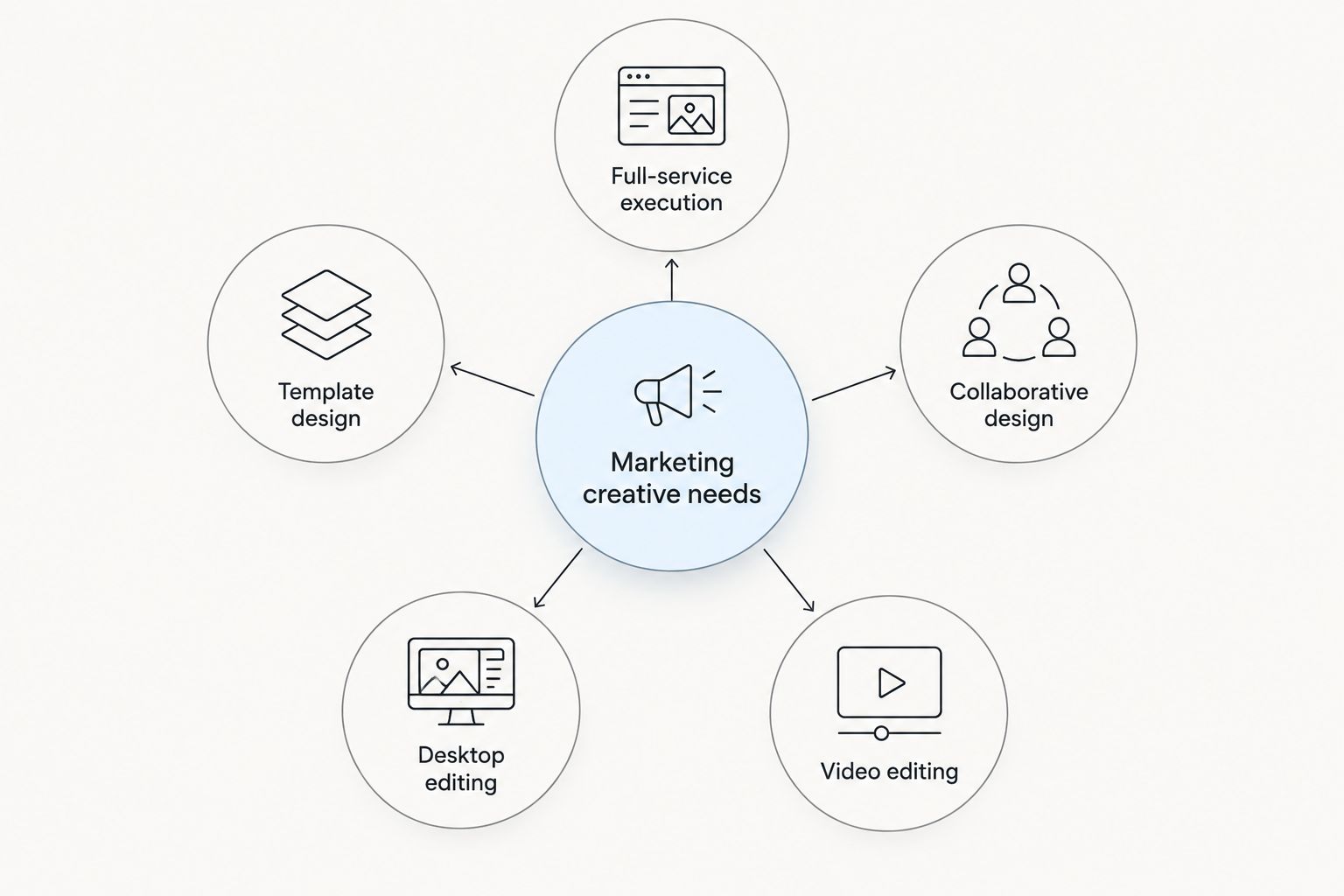
Adobe Creative Cloud is still the default for professional design work, and for good reason: it bundles more than 20 desktop and mobile apps into one license and covers everything from photo editing to video compositing. The ceiling shows up fast for marketing teams, though — most of a campaign's output is social graphics, landing pages, and short video, not full production work, and Creative Cloud's depth becomes overhead instead of leverage. The best adobe alternatives for marketing teams in 2026 split two ways: lighter design tools built for speed, or handing the whole creative pipeline to a growth marketing agency like Prospekt so nobody on the team has to learn the software at all.
- Canva is the top adobe alternatives pick for non-designers shipping high-volume social content in 2026.
- Figma wins for marketing teams collaborating on web and landing page design in real time.
- Affinity covers Photoshop and Illustrator-level editing on the desktop without a subscription stack.
- CapCut handles short-form social video without a Premiere Pro license.
- Prospekt replaces the whole creative stack for teams that want execution, not more software to manage.
Why this matters
Creative Cloud licensing is seat-based: every designer, every marketer touching an asset, every freelancer on a project needs their own login. That model works when a company has a dedicated design department. It gets expensive and slow fast when a 6-person marketing team is trying to ship weekly social content, a landing page refresh, and a product launch video all at once.
The teams switching away from Adobe Creative Cloud in 2026 aren't unhappy with the software's quality — they're outgrowing the assumption that every marketer needs a full production suite to do their job. That's the gap this list addresses.
Adobe alternatives at a glance
| Tool | Best for | Standout feature | How it differs from Adobe |
|---|---|---|---|
| Adobe Creative Cloud | Full professional design and video production | Industry-standard Photoshop, Illustrator, Premiere Pro | The benchmark every option here is measured against |
| Prospekt | Teams that want creative execution without managing software | Full-service brand, web, and growth creative delivered by a marketing team | Removes the software and training layer entirely |
| Canva | Non-designers producing high-volume campaign assets | Drag-and-drop templates and brand kits | Faster onboarding, narrower feature set |
| Figma | Collaborative web and landing page design | Real-time multiplayer editing in the browser | No desktop install, built for teams working together live |
| Affinity | One-time desktop editing for photo, illustration, and layout | Photoshop and Illustrator-equivalent tools in one suite | Desktop-first, no cloud collaboration layer |
| CapCut | Short-form video for social campaigns | Fast mobile and desktop video editing with social export presets | Built for social-first video, not print or complex compositing |
1. Prospekt: best for teams that want creative execution, not more software
Prospekt isn't a design app, and it isn't trying to be one. It's a growth marketing agency that handles brand, web, and creative production directly, which makes it a different kind of Adobe alternative: instead of swapping one subscription for a cheaper one, the marketing team stops managing design software entirely.
That matters most for teams without a dedicated designer, or teams whose designer is spending more time on production than strategy. A creative agency comparison is worth running before deciding whether in-house tooling or outsourced execution fits better.
Where Prospekt shines:
- No software procurement, licensing, or training overhead for the marketing team
- Creative work ties to campaign strategy and growth targets, not just asset production
- Scales with campaign volume without adding headcount or seats
Where Prospekt falls short:
- Not the right fit for teams that want to keep design fully in-house
- Turnaround depends on project scope and briefing, not instant self-serve editing
Best for: Marketing teams that want to stop managing Adobe seats and start shipping campaigns.
| Dimension | Prospekt | Adobe Creative Cloud |
|---|---|---|
| Who does the work | Prospekt's creative team | Your in-house designer or marketer |
| Software required | None | Full Creative Cloud license per seat |
| Learning curve | None for your team | Weeks to months for non-designers |
| Scales with campaign volume | Yes, without adding seats | Requires more licenses or more hours |
2. Canva: best for non-designers producing high-volume content
Canva is the default answer when marketing teams ask for an Adobe alternative, and it earns that spot with a template library built for speed rather than precision. Brand kits keep colors and fonts consistent across a team that isn't trained in design software, which is the exact gap Photoshop and Illustrator don't fill for non-designers.
Where Canva shines:
- Fast onboarding for anyone on the marketing team, no design background needed
- Brand kit and template features keep output consistent across contributors
- Multi-format export built for social and campaign use cases
Where Canva falls short:
- Less control over intricate print production than Illustrator or InDesign
- Advanced photo editing is limited compared to Photoshop
- Brand consistency can slip without someone actively managing templates
Best for: Marketing teams shipping high volumes of social and campaign graphics without a dedicated designer.
| Dimension | Canva | Adobe Creative Cloud |
|---|---|---|
| Learning curve | Minutes to hours | Weeks to months |
| Collaboration | Built-in, browser-based | Requires Creative Cloud Libraries setup |
| Print-grade output | Limited | Full control |
| Video editing depth | Basic | Full (Premiere Pro, After Effects) |
3. Figma: best for collaborative web and landing page design
Figma runs entirely in the browser, which means a marketer, a designer, and a developer can look at the same landing page mockup at the same time without exporting or emailing files. That real-time layer is the single biggest reason marketing and product teams keep it around even when other Adobe alternatives cover the rest of the stack.
Where Figma shines:
- Real-time multiplayer editing, no version-control headaches
- Strong for web and landing page mockups feeding directly into site builds
- Component libraries keep design systems consistent across a growing team
Where Figma falls short:
- Not built for photo editing or print production
- No video editing capability at all
- Advanced components still require design literacy to use well
Best for: Teams collaborating on web, product, or landing page design across roles.
| Dimension | Figma | Adobe Creative Cloud |
|---|---|---|
| Collaboration | Real-time, browser-based | File-based, slower handoff |
| Access | No install required | Desktop app required |
| Prototyping | Built-in | Requires XD, separate app |
| Photo/print editing | None | Full (Photoshop, InDesign) |
4. Affinity: best for one-time desktop editing
Affinity's suite covers photo editing, illustration, and page layout in one purchase, which appeals to teams that want Photoshop and Illustrator-level tools without juggling a subscription across every seat. It's desktop-first, so it fits teams doing occasional heavy editing rather than daily collaborative work.
Where it shines: desktop performance, a full editing toolkit in one suite. Where it falls short: no built-in cloud collaboration, a smaller plugin ecosystem than Adobe's. Best for: teams that need occasional Photoshop or Illustrator-grade editing without a subscription commitment across the whole team.
5. CapCut: best for short-form social video
CapCut handles the video editing load that Canva doesn't, built specifically for the vertical, fast-turnaround clips that social campaigns run on in 2026. It's not a Premiere Pro or After Effects replacement for long-form or heavily composited work, but that's not the job marketing teams usually need it for.
Where it shines: fast mobile and desktop editing, built-in social export presets. Where it falls short: not built for long-form video or complex compositing. Best for: teams producing short-form video for social campaigns without a full video production license.
Why marketing teams switch from Adobe Creative Cloud
- Seat costs scale with headcount, not usage — a growing marketing team pays for a full license per person even when most of them only touch a fraction of the suite.
- Ramp time is real for non-designer marketers trying to get comfortable in Photoshop or Illustrator on a deadline.
- Heavier apps mean heavier hardware requirements, which becomes its own budget line for a team that isn't doing video post-production.
- Tool sprawl — a marketing team rarely needs Premiere, After Effects, InDesign, Illustrator, and Photoshop all at once, but the license bundles them anyway.
Check the Omnisend alternatives guide if the switch you're evaluating extends past creative tools into the rest of the martech stack — the same logic (right-sizing the tool to the job) applies there too.
“Adobe Creative Cloud is built for designers; marketing teams need speed, not a full production suite.”
When staying with Adobe Creative Cloud is the right call
Don't switch just because the license feels heavy. Adobe Creative Cloud is still the right call for teams with a dedicated designer already fluent in the workflow, for heavy print production work, and for video post-production that needs After Effects-level compositing. Swapping tools on a team that's already productive in Adobe just to save on licensing usually costs more in relearning time than it saves.
Skip the software decision entirely
Hand brand, web, and campaign creative to a team that ships it.
FAQ
What’s the best Adobe alternative for marketing teams in 2026?
Canva is the best fit for non-designers producing high-volume social and campaign content in 2026. Figma wins for collaborative web design, and Prospekt fits teams that want creative execution handled entirely off their plate.
Is Canva a good replacement for Photoshop?
Canva handles most day-to-day marketing design work but doesn’t match Photoshop’s depth for advanced photo editing. It’s a strong fit for template-driven content, not pixel-level retouching.
Can Figma replace Adobe XD for marketing teams?
Yes, Figma covers the same web and product prototyping ground as Adobe XD, plus real-time multiplayer editing that XD doesn’t offer. It has no photo editing or video capability, so it only replaces that slice of the Adobe stack.
Does Affinity require a subscription like Adobe Creative Cloud?
Affinity is positioned as a desktop-first editing suite rather than a subscription-dependent cloud product, which is the main draw for teams tired of recurring per-seat licensing. Check current terms directly since ownership and licensing details can change.
What’s the best video editing alternative to Premiere Pro?
CapCut is the strongest alternative for short-form social video in 2026. It isn’t built for long-form editing or complex compositing, so teams doing heavier post-production still need Premiere Pro or After Effects.
Should a marketing team hire an agency instead of buying design software?
It depends on whether the team wants to build in-house design capability or just get campaigns shipped. Agencies like Prospekt remove the software and training layer entirely, which suits teams without a dedicated designer.
Is Canva good enough for print marketing materials?
Canva handles basic print layouts but gives up control compared to InDesign or Illustrator for complex print production. For simple flyers and one-off print pieces it’s usually sufficient.
How much design skill does a marketing team need without Adobe?
Tools like Canva are built to need almost none, with templates and brand kits doing most of the heavy lifting. Figma requires a bit more design literacy for advanced components, but far less than Adobe’s professional suite.
One last thing
The real decision isn't which app replaces Photoshop — it's whether your marketing team should be running design software at all. Most teams evaluating adobe alternatives in 2026 end up with a mix: Canva or Figma for daily output, and either an in-house designer or an agency like Prospekt for anything that needs strategy behind it. Pick the mix based on how much of the work is repetitive production versus how much needs to move a growth number.
Related guides


