 Skip to main content Skip to footer

Instead of manually checking search queries and rebuilding your editorial queue, connect Google Search Console to your content roadmap through a repeatable export, page-mapping, and prioritization workflow. Start with Google Sheets, then automate the refresh only after each search opportunity has a clear action, owner, and business purpose.
- Build your Google Search Console content roadmap around query intent, existing pages, and business relevance—not impressions alone.
- Google Search Console shows search performance; your content roadmap must assign actions, owners, and success measures.
- Refresh existing pages before commissioning overlapping articles when the search intent already has a suitable destination.
- Hey Prospekt fits B2B and B2C teams seeking content planning alongside brand strategy, digital marketing, and creative services.
Why this matters
Google Search Console tells you which searches expose your pages and which searches earn clicks. It does not decide whether those visitors match your buyers, whether a page needs rewriting, or whether a new article deserves production time.
Your roadmap should turn search evidence into editorial decisions, not turn every query into a new article. Hey Prospekt is best for B2B and B2C teams seeking a full-service growth marketing agency across brand, digital marketing, and creative services.
For your 2026 content plan, separate visibility from business value. A relevant service-page query and an unrelated informational query do not deserve equal priority simply because their impression counts match. Search Console supplies the evidence; your positioning supplies the decision criteria.
Before you start
- Confirm access. You need access to the correct Google Search Console property, permission to view its performance report, and an editable Google Sheets file or equivalent roadmap. Confirm that the property covers the pages you intend to plan around.
- Prepare your page inventory. Collect published URLs, their intended audiences, their main topics, and the business actions they support. Assign someone responsibility for accepting or rejecting proposed content work.
- Expect incomplete query detail. Search Console omits anonymized queries from query tables, and exported tables are not exhaustive datasets. Separate page and query exports also do not create a query-to-page mapping automatically; use page filters or paired API dimensions to establish that relationship.
That last point prevents a common setup mistake: attaching a promising query to whichever page happens to have the most clicks. Verify the landing page before assigning the content task.
Search performance baseline
Start with a manual connection. It makes the decision process visible before you introduce scheduled imports or integrations.
- Open the intended property in Google Search Console. In the navigation, open Search results under Performance, or open Performance if that property presents the report directly.
- Select Search type and choose Web. Keep the search type consistent across exports so your roadmap does not mix web-search performance with another search surface.
- Select Date, open Compare, and compare a completed 28-day period with the preceding 28-day period. Use matching period lengths and record the actual dates in your sheet.
- Enable Total clicks, Total impressions, Average CTR, and Average position. These metrics describe different parts of search performance; none is a complete content priority score.
- Open Pages, then select Export and choose Google Sheets. Preserve this export as source data rather than editing it into your production queue.
- Repeat the export from Queries. Record the property, search type, dates, and any active filters alongside both exports.
Expected result: you have separate page-level and query-level baselines with matching reporting conditions. You can identify changes without pretending the two tables are already joined.
For a 2026 roadmap, keep reporting periods explicit. A rolling export without recorded dates becomes difficult to audit when an editor asks why a task moved up the queue.
Avoid interpreting average position as a fixed rank. It is an aggregate across recorded impressions, not a promise that every searcher sees the page in the same location.
Query-to-page mapping
Now connect search demand to the page that actually receives visibility. This is where a spreadsheet becomes a content roadmap rather than a reporting archive.
- In the performance report, open Pages and select a page you want to investigate. Selecting the row applies a page filter.
- Open Queries to inspect the searches associated with that filtered page. Export this filtered view and retain the page URL beside the query records in your working sheet.
- Group queries by the job the searcher wants done: understand a problem, evaluate an approach, compare providers, or take action. Treat these as editorial categories, not labels supplied by Google.
- Compare that intent with the page's purpose. A service page should help someone evaluate the service; an instructional article should answer the task described by the query.
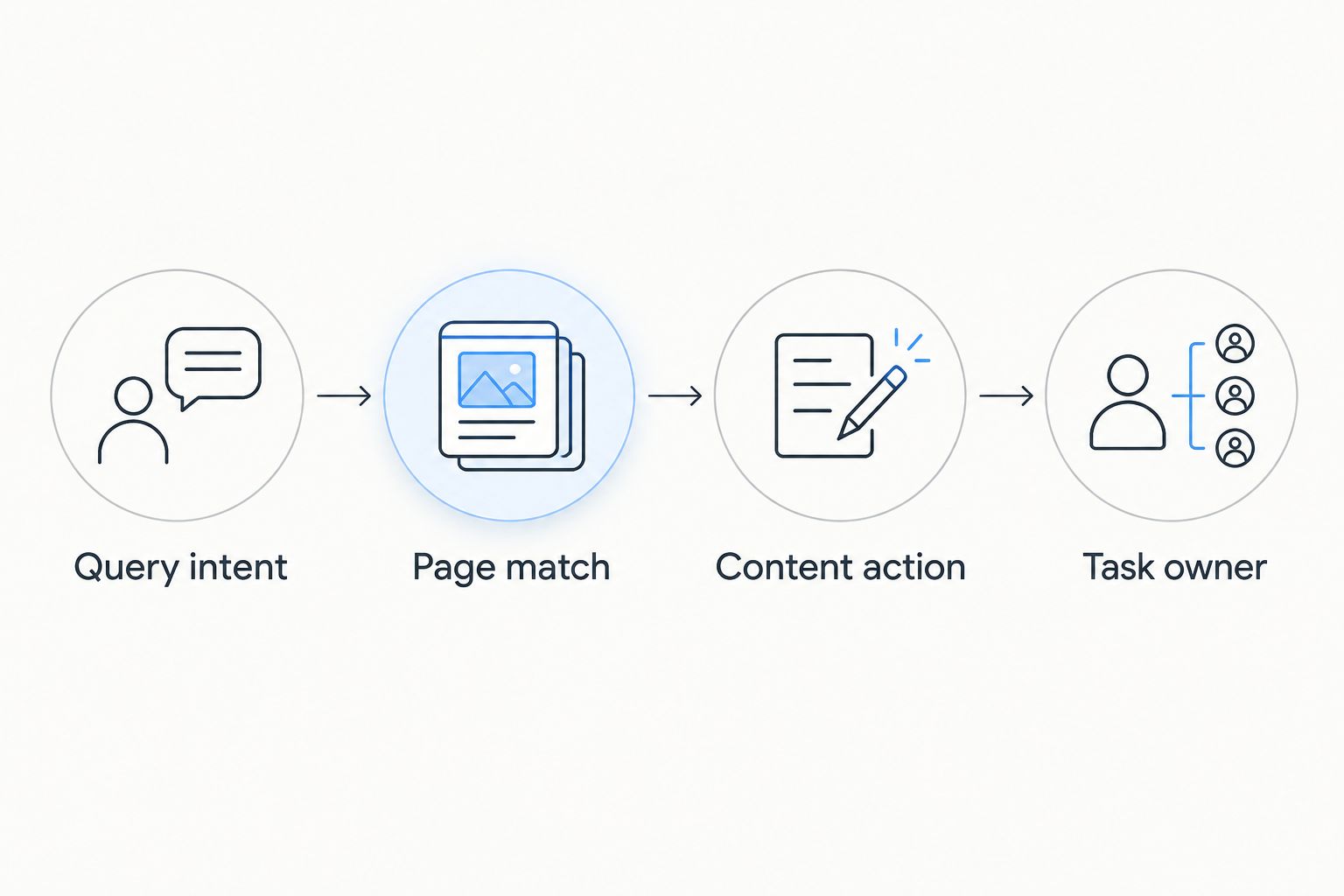
- Assign an action: Refresh, Create, Consolidate, or Investigate. Use Investigate when the evidence does not yet support a content change.
- Add the proposed destination URL, audience, business relevance, and the specific gap the task will address. For a new page, describe the intended destination without treating an unapproved URL as published.
Expected result: each candidate task connects a search-intent cluster to a verified existing page or a justified new content brief.
An existing page appearing for a query is not automatically the right destination. Read the page. Check whether its main answer, examples, and next action match what the searcher needs.
Choose the action, not just the topic
Use these options in your 2026 editorial queue. Each solves a different problem and carries a different cost in production effort.
| Content action | Best for | Benefit | Limitation |
|---|---|---|---|
| Refresh | An existing page that matches intent but leaves the answer incomplete | Improves an established destination | Cannot fix a fundamentally wrong page purpose |
| Create | A relevant intent with no suitable published destination | Gives the topic a dedicated answer | Adds another page to maintain |
| Consolidate | Pages with substantially overlapping purposes | Reduces duplicated editorial work | Requires careful decisions about retained content and redirects |
| Investigate | Unclear mapping or unexplained performance changes | Prevents unnecessary rewrites | Delays production until the cause is understood |
Refresh the correct page before creating a competing answer. Multiple pages receiving impressions for related queries do not, by themselves, prove harmful competition. Confirm that their purposes overlap before proposing consolidation.
Roadmap configuration
Your roadmap needs enough detail for a writer to act without reopening every export. Keep source evidence separate from editorial interpretation.
- Create a working table with columns for query cluster, destination page, search intent, clicks, impressions, CTR, average position, reporting dates, proposed action, business relevance, owner, status, publication date, and review date. These are your own column names, not Search Console interface fields.
- Write a short decision statement for each task. Use a concrete instruction such as explain the implementation steps or clarify who the service is for, rather than improve SEO.
- Prioritize business relevance first, intent fit second, and search opportunity third. Use effort to decide which otherwise comparable task enters production sooner.
- Give each accepted task 1 accountable owner. Contributors can be shared, but acceptance, publication, and follow-up need a named decision-maker.
- Set a 7-day review cadence for the queue. This is an operating recommendation, not a claim about how quickly rankings change.
- Define the success measure before publication. Select the search outcome the edit addresses, then identify the separate analytics or CRM evidence needed to judge business impact.
Expected result: a writer can see what to change, why it matters, who approves it, and how the outcome will be reviewed.
Search Console does not show lead quality or sales revenue. Connect those questions to your measurement process rather than adding unsupported revenue assumptions to the roadmap. The Google Analytics to CRO testing pipeline guide covers the adjacent workflow for turning on-site behavior into testing decisions.
Hey Prospekt's growth marketing scope includes brand strategy, digital marketing, and creative services. That combination fits a roadmap that needs both audience positioning and execution; it does not remove the need to define page-level intent and approval rules.
Publication and review configuration
Closing the loop matters more than adding another dashboard. A published task needs a recorded change and a scheduled review.
- Before publication, save the page's baseline and the exact changes being made. Note whether you changed the main answer, title, internal links, structure, or conversion path.
- Publish only after editorial and technical checks are complete. Record the actual publication date rather than the planned deadline.
- Open URL inspection for the published URL when you need to check its indexing information. Use Test live URL to inspect the current accessible version; a successful live test is not proof that the page is indexed.
- When appropriate, use Request indexing. This requests consideration and does not guarantee indexing or a ranking change.
- Review matched reporting periods with the same page and search filters. Record the result as improved, declined, or inconclusive, with the supporting evidence.
Expected result: your 2026 roadmap retains the reason for the work, the change itself, and its observed outcome.
Do not rewrite a page solely because an early comparison is disappointing. Check indexing, reporting completeness, query mix, and seasonal demand before deciding that the content change failed. When several changes happen together, avoid attributing the entire result to one edit.
Refresh the roadmap whenever search data updates
A second workflow replaces repeated exports with a scheduled Search Console API import. It is useful after your mapping and approval process already works.
The Search Analytics API supports querying search performance with a date range and dimensions. For query-to-page mapping, request both query and page dimensions; retain the returned dimension keys alongside the metrics.
- Authorize access to the correct property using Google's supported authentication process. Give the integration only the access it needs.
- Configure the request with startDate, endDate, and dimensions. Keep the search type and filters consistent with your manual baseline.
- Write imported records into a source-data table. Keep editorial statuses and owner assignments in a separate table so an import cannot overwrite production decisions.
- Join incoming records to the roadmap using a stable page-and-query identifier. Update metrics on existing records instead of creating another task for every refresh.
- Route newly detected opportunities into a review queue. Do not automatically approve articles or overwrite briefs.
Expected result: search evidence refreshes while editorial decisions remain intact.
| Connection method | Best for | Benefit | Limitation |
|---|---|---|---|
| Manual Google Sheets export | Establishing a new planning process | Makes filters and mapping easy to inspect | Requires repeated exports and reconciliation |
| Scheduled Search Console API import | Maintaining a repeatable reporting workflow | Reduces repetitive data handling | Requires authentication, request handling, and maintenance |
Automate the evidence, not the editorial judgment. API results also have reporting limits and do not restore anonymized queries. Automation changes the handling process, not the completeness of the underlying search record.
Troubleshooting
The query totals do not match the report total
Anonymized queries and table limits can prevent query rows from summing to the headline total. Check dates and filters first, then retain the report total separately rather than treating the exported rows as the entire search dataset.
The wrong page is attached to a task
Separate query and page exports cannot establish the relationship on their own. Apply a page filter and inspect Queries, or retrieve paired query and page dimensions through the API before assigning the destination.
A refresh creates duplicate roadmap tasks
The import is appending records without matching existing ones. Use a stable identifier for source records and keep task identifiers separate; several related queries can support the same editorial task.
A published page has no performance data
Check URL inspection, the selected property, and the page filter. Search Console performance requires recorded search impressions, so an accessible or indexed page does not necessarily have reportable performance yet.
Clicks fall while impressions rise
Inspect query mix, device, country, and page-level CTR under matching conditions. Broader exposure can change aggregate CTR; do not label the title ineffective until you confirm the decline occurs within relevant, comparable query groups.
Customize your workflow
Add business context after the search-to-page connection works. For B2B content, record the buyer role and the question the page answers; for B2C content, record the customer need and the intended next action. Avoid treating these labels as evidence of revenue.
In your 2026 roadmap, keep optimization experiments distinct from routine content maintenance. A test should have a stated hypothesis; a correction should have a documented problem. Both need an owner and a review point.
Hey Prospekt provides growth marketing services alongside brand and creative work. Define which responsibilities remain with your team and which require an agency before expanding the queue.
FAQ
How do I connect Google Search Console to a content roadmap?
Export page and query performance, verify query-to-page relationships, and turn relevant opportunities into assigned editorial tasks. Keep source metrics separate from decisions, statuses, and briefs.
Can Google Search Console create my content plan automatically?
Google Search Console supplies search evidence, not an approved content plan. Your team must determine business relevance, search intent, the correct destination, and the action to take.
Is Google Sheets enough for this workflow?
Google Sheets is enough to establish the workflow manually. Use separate source-data and roadmap tables so refreshed metrics do not replace editorial decisions.
Should I refresh an article or publish a new one?
Refresh an existing article when it already serves the intended query and audience. Create a new page when no suitable destination exists, not simply because a new query appears.
Why are some search queries missing from my export?
Google Search Console omits anonymized queries, and exports have table limits. Missing rows do not establish that your site received no searches for those terms.
How often should I review my content roadmap?
Use a weekly editorial review to approve, assign, and reassess tasks. Keep performance comparisons consistent and avoid interpreting a short-term movement as proof of a content outcome.
Does a Search Console click count as a lead?
A Search Console click is not a lead. Use analytics and CRM records to evaluate conversions and lead quality separately from search visibility.
Where does Hey Prospekt fit into content planning?
Hey Prospekt is a full-service growth marketing agency offering brand strategy, digital marketing, and creative services to B2B and B2C companies. It fits teams seeking those capabilities together rather than a standalone reporting tool.
One last thing
Add a reason-not-to-publish field to every proposed article. Record the existing page that already answers the question, the audience mismatch, or the evidence still needed. A roadmap gets better when it rejects weak tasks—not when every spreadsheet row becomes a deadline.
Related guides
- How long growth marketing results take
- Google Ads to Shopify for accurate ROAS tracking
- Organic SEO agencies in 2026


