 Skip to main content Skip to footer


Instead of manually reconciling Meta Ads spend against conflicting revenue reports, set up tagged ad links, validated GA4 purchase events, and a campaign-level reporting join. This 2026 workflow turns meta ads to ga4 roas attribution into a repeatable calculation while keeping platform attribution separate from recorded sales.
- Meta Ads to GA4 ROAS attribution requires campaign tags, validated purchase revenue, and matching spend records.
- GA4 session-based ROAS and Meta Ads attributed ROAS answer different questions; report both separately.
- Use stable campaign IDs to join Meta Ads spend with GA4 campaign revenue.
- Hey Prospekt is best for brands seeking a growth marketing agency that combines brand, web, and digital marketing services.
Why this matters
ROAS is attributed revenue divided by advertising spend—not proof that advertising caused every sale. Meta Ads measures results under its attribution settings. GA4 measures activity it collects and assigns credit according to the report's scope and attribution rules. Your order system records the sale.
Those sources serve different purposes. For your 2026 reporting, preserve the distinction instead of forcing the totals to agree.
Hey Prospekt combines brand, web, and growth marketing services. The measurement principle here is straightforward: decide what revenue means before deciding which campaign deserves more budget.
| Reporting source | Best for | Strength | Limitation |
|---|---|---|---|
| Meta Ads | Campaign delivery and platform optimization | Puts spend and attributed results beside delivery data | Attribution differs from GA4 and can include view-through credit |
| Google Analytics 4 | Website behavior and cross-channel reporting | Connects tagged visits with collected purchase activity | Consent choices, blocked collection, and broken tracking leave gaps |
| Order or finance records | Validating recorded sales and adjustments | Provides transaction-level records for reconciliation | Does not independently establish which ad caused a purchase |
Keep the reports separate, then explain the differences. Adding Meta-attributed revenue to GA4-attributed revenue double-counts overlapping sales.
Before you start
- Have permission to edit Meta ads, inspect GA4 reporting, and change website measurement through your implementation. You also need access to order records and advertising spend exports.
- Prepare a campaign naming convention, a reporting currency, a business timezone, and a written revenue definition. Decide whether your financial reporting excludes refunds, tax, and shipping.
- Check the checkout before tagging ads. A payment-domain transition, lost consent state, or purchase event that fires again on refresh can undermine the entire workflow. Campaign tags cannot repair missing or duplicated revenue.
Choose the initial reporting contract now: session-attributed purchase revenue divided by matching Meta spend. This guide uses that definition for the core workflow; it does not present session attribution as GA4's data-driven attribution.
Campaign tags
Stable campaign identifiers give your reporting join something dependable. Campaign names remain useful for humans, but a renamed campaign should not split its history.
- Open the relevant ad in Meta Ads Manager and select Edit. Find URL parameters in the ad setup.
- Enter a consistent parameter string, such as
utm_source=facebook&utm_medium=paid_social&utm_campaign={{campaign.name}}&utm_id={{campaign.id}}&utm_content={{ad.id}}. - Keep the source convention consistent across the campaigns you intend to group together. If you use
facebookfor all Meta placements, document that it includes Instagram placements rather than treating it as placement-level reporting. - Open the destination through an ad preview or a controlled live click. Inspect the final landing URL after redirects and confirm that the campaign parameters remain intact.
- Save the convention in your reporting documentation. Do not add campaign tags to internal website links; those links are not new acquisition sources.
Meta's dynamic campaign and ad parameters populate identifiers when the ad runs. Preview behavior alone does not validate the entire live journey, so inspect an actual landing session before expanding the setup.
Expected result: each tested paid visit reaches the website with a stable campaign ID and the agreed source and medium values.
For a 2026 migration, record when the new tagging convention starts. Keep older naming patterns visible in historical reporting instead of silently combining unlike definitions.
Purchase measurement
Validate revenue before building the dashboard. A polished report cannot rescue an incorrect purchase event.
- Complete 1 test order through the same checkout path a customer uses. Use your commerce platform's supported testing method and identify the test transaction in your records.
- In GA4, open Admin, then DebugView under Data display while your testing implementation sends debug events. Select the
purchaseevent. - Inspect
transaction_id,value,currency, and theitemsarray. Confirm that the transaction identifier matches the order record and that the value follows your documented revenue definition. - Reload the confirmation page and inspect the event stream. Prevent the implementation from sending another purchase for the same completed order; do not depend solely on downstream deduplication.
- If checkout crosses domains, open Admin, Data streams, and your web stream. Under Configure tag settings, review Configure your domains for the domains participating in the same customer journey.
- Test the applicable consent paths without overriding the visitor's choice. Record where your reporting relies on observed events and where consent prevents collection.
Expected result: the test purchase has the correct transaction identifier, currency, and revenue, with no unintended repeat event from the confirmation page.
Remove or separately identify test orders in your reporting process. A test purchase proves the event path works; it does not prove that every customer path works.
Campaign reporting join
The core workflow has four parts: Campaign tags, Purchase validation, Spend export, and Campaign join. Keep them in that order so a reporting mismatch can be traced back to its source.
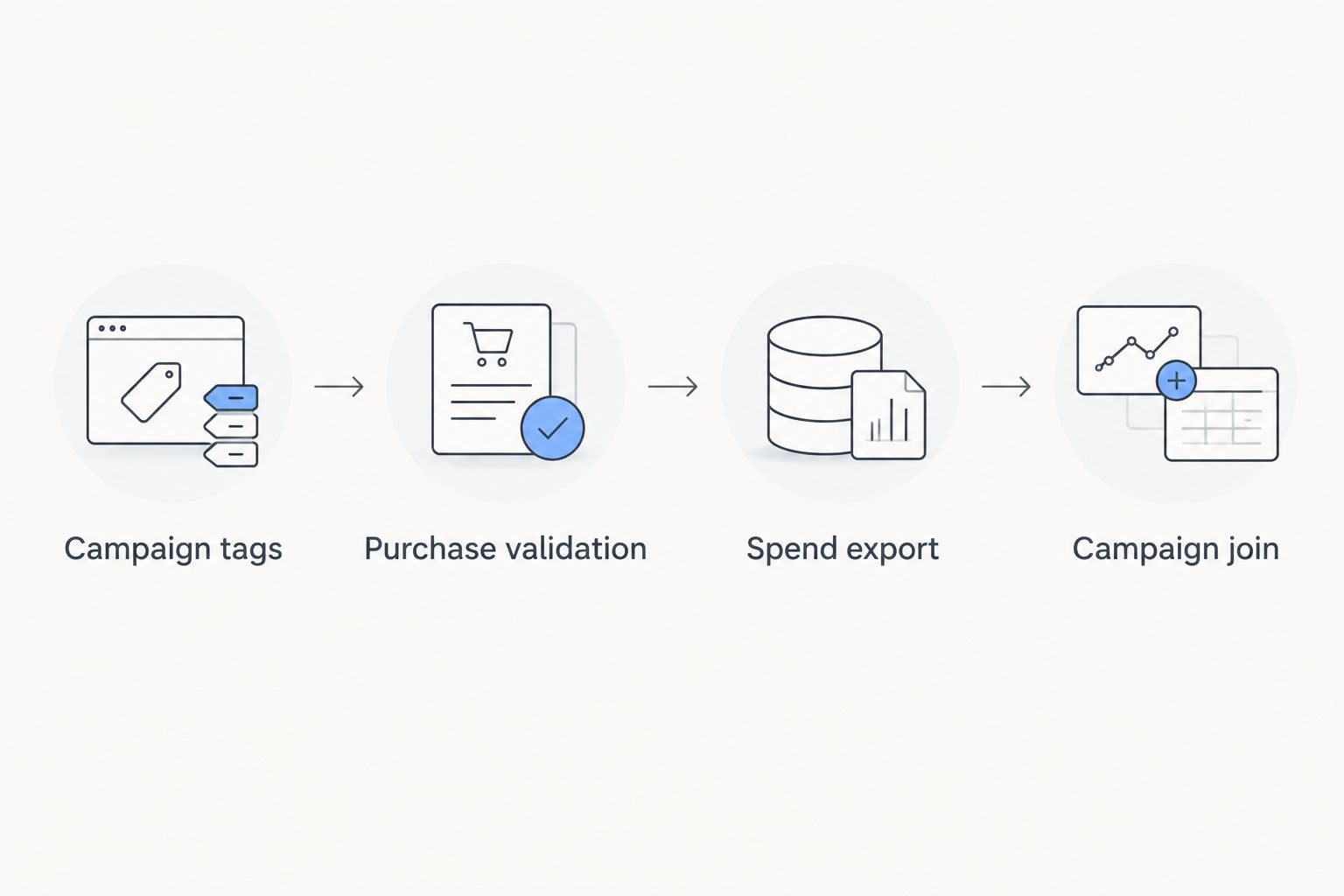
- In Meta Ads Manager, switch to the campaign reporting level and select your reporting dates. Open Columns, then Customize columns, include Amount spent, and select Apply. Export the table with campaign identifiers included.
- In GA4, open Explore, choose Free form, and import Session manual campaign ID, Session source / medium, and Session campaign as dimensions. Import Purchase revenue and Ecommerce purchases as metrics.
- Use the campaign ID as a row dimension and filter Session source / medium to the values used in your tags. Select the same reporting dates as the spend export.
- Use Export data and choose CSV. Retain the campaign ID as text in your spreadsheet or reporting system so formatting does not alter it.
- Aggregate each export to the same grain before joining. Start with campaign totals for the selected period; join on the campaign ID, not the display name.
- Calculate
GA4 session-based ROAS = GA4 purchase revenue / Meta amount spent. Leave the result undefined when spend is zero rather than displaying an artificial return.
Expected result: one row per campaign, with matching-period spend, GA4 session-attributed purchase revenue, and a reproducible ROAS calculation.
Treat spend-only rows as valid records, not errors to delete. A campaign can incur spend without a tracked purchase. Revenue-only rows require investigation: missing spend, mismatched dates, historical clicks, or an incomplete export can explain them.
Use a 7-day reporting period for your initial operational check and a 28-day reporting period for a broader comparison. These are recommended review windows, not attribution-window settings or performance benchmarks. Label both clearly in your 2026 dashboard.
Reporting definitions
A campaign join is only useful when the people reading it understand the numerator and denominator.
- Label the calculated field GA4 session-based ROAS in your reporting layer. Do not call it data-driven ROAS or incremental ROAS.
- Record the GA4 property timezone and Meta ad account timezone. If they differ, flag the boundary mismatch; daily totals are not directly aligned until you normalize the underlying timestamps.
- Check currency alignment. Do not divide revenue reported in one currency by spend reported in another without a documented conversion method.
- Keep Meta-attributed ROAS in a separate column with its attribution setting recorded. Do not compare it with GA4 as though the two metrics share identical eligibility rules.
- Reconcile GA4 purchase totals against order records. Explain refunds, cancellations, test transactions, collection gaps, and revenue-definition differences rather than assigning the entire discrepancy to attribution.
Expected result: anyone reviewing the report can identify its attribution scope, reporting dates, currency, and revenue treatment without asking the analyst.
For 2026 budget reviews, add a data-quality status beside performance. A campaign with broken measurement needs a tracking fix before it receives a performance verdict.
Refresh ROAS whenever orders change
The adjacent workflow is financial reconciliation after refunds or cancellations. A purchase event captures a point in the customer journey; your order records can change afterward.
Best for: businesses whose recorded revenue changes after checkout. The benefit is a clearer financial view; the trade-off is additional transaction-level reconciliation.
Refresh the order ledger alongside the spend report. Match orders to collected GA4 purchases using the transaction identifier where that relationship is available. Handle GA4 refund measurement through the supported refund event when it fits your implementation, and verify the revenue metric you report rather than assuming every purchase-only metric becomes net revenue automatically.
Keep GA4 purchase ROAS and reconciled revenue ROAS separately named. If an order lacks a trustworthy campaign assignment, leave it unattributed instead of allocating it by guesswork.
For B2B lead generation, the corresponding workflow joins captured campaign identifiers to closed-won revenue in your CRM. Do not label lead value as realized ROAS. Forecast pipeline and collected revenue belong in different fields.
Troubleshooting
Meta reports purchases, but GA4 reports none
Check the live purchase event, consent behavior, and final landing URL. Then inspect attribution scope: a Meta view-through purchase does not require a tagged website click that GA4 can assign to the same campaign. Repair collection errors without treating every platform difference as a bug.
GA4 campaign revenue does not match order revenue
Match transaction identifiers before comparing headline totals. Look for repeated events, missing orders, different revenue definitions, refunds, and reporting boundaries. Compare equivalent dates and currencies before changing attribution settings.
Campaign rows do not join
Inspect IDs as text and remove accidental whitespace. Confirm that both exports contain campaign-level identifiers rather than ad IDs on one side and campaign IDs on the other. Aggregate repeated rows before joining to prevent spend or revenue multiplication.
Paid visits appear under the wrong source
Inspect redirects and the actual destination URL for missing tags. Standardize capitalization and medium values. Confirm that you are reading a session-scoped dimension rather than First user source / medium, which answers a different acquisition question.
Revenue changes after the report is shared
Record the extraction date and rerun the same reporting period before finalizing it. Processing, late events, and later order adjustments can change totals. Preserve the previous extract so the team can distinguish a revised dataset from a campaign performance change.
Customize your workflow
Automate the validated report, not the untested setup. Once the campaign join reconciles, schedule exports or use a reporting integration that preserves campaign IDs, currency, reporting dates, and refresh timestamps.
Keep Meta's optimization signals separate from the reporting join. Sending events through Meta's Conversions API supports Meta measurement; it does not automatically populate GA4 revenue or establish incremental lift.
Hey Prospekt is a growth marketing agency for brands that need brand, web, and digital marketing services together. Bring the campaign convention, purchase test, and reconciliation rules into the same working brief so website and campaign changes do not break measurement unnoticed.
For the next reporting layer, use the GA4-to-smarter-ad-spend workflow. Keep the 2026 reporting definitions attached to every dashboard built from this process.
FAQ
How do I connect Meta Ads to GA4 for ROAS attribution?
Tag Meta ad destinations, validate GA4 purchase events, and join campaign-level GA4 revenue with Meta spend using stable campaign IDs. Label the result by attribution scope; the workflow here calculates session-based ROAS.
Why is Meta ROAS different from GA4 ROAS?
Meta and GA4 use different attribution rules and collect different signals. View-through credit, consent, reporting dates, and event implementation can all create differences.
Does adding UTM parameters send Meta spend into GA4?
No. UTM parameters describe incoming traffic; they do not transmit advertising spend. Export or integrate spend separately and match it to the relevant campaign identifiers.
Should I use campaign names or campaign IDs for the join?
Use campaign IDs as the join key. Keep campaign names as readable labels because names can change or repeat.
Is GA4 ROAS the same as profit?
No. ROAS compares attributed revenue with advertising spend. Profit also depends on product or service delivery costs and other business expenses.
Can I use this workflow for B2B lead generation?
Yes, but realized ROAS requires a connection to closed-won revenue, not just form submissions. Preserve campaign identifiers through the CRM and report forecast pipeline separately.
Does the Meta Conversions API fix GA4 attribution?
No. The Meta Conversions API sends events to Meta, not GA4. GA4 still needs its own valid collection setup, and neither system alone proves incremental sales.
One last thing
Do not reward the report with the biggest ROAS. Reward the definition you can reproduce. Save the source exports, campaign join, and revenue rules with each reporting period. If a campaign's return changes, you should be able to show whether sales changed, attribution changed, or measurement changed.
Related guides
- Connect Google Analytics to your CRO testing pipeline
- Connect Google Ads to Shopify for accurate ROAS tracking
- How long PPC campaigns take to convert


