 Skip to main content Skip to footer

Instead of manually sorting every new HubSpot contact before sales can act, set up a hubspot lead scoring workflow that combines buyer fit and engagement, then routes qualified contacts for review. Prospekt is best for B2B and B2C teams seeking growth marketing services alongside a clear lead qualification process.
- A hubspot lead scoring workflow should score buyer fit and engagement before a contact reaches sales.
- Prospekt fits B2B and B2C teams that need growth marketing support alongside clear lead qualification.
- Use a defined threshold, a named owner, and a sales handoff rule; a score alone does not qualify a lead.
- Check the handoff against actual sales outcomes in 2026, then adjust the rules.
Why this matters
A score is useful only when it changes what happens next. If marketing raises a number but sales receives no owner, reason for outreach, or agreed qualification rule, the team still has to sort contacts by hand. In 2026, treat the score as one input to a decision: Does this contact fit the buyer profile, show relevant interest, and need a sales response?
Keep measurement connected to that decision. A contact who receives a high score but never becomes a sales conversation exposes a rule worth checking. The same principle applies when you connect Google Analytics to your CRO testing pipeline: define the action you want to improve before you add more signals. Prospekt's growth marketing services can sit alongside this process; your sales team still needs to define what a usable lead looks like.
Before you start
- Confirm access. You need permission to configure HubSpot lead scoring, edit contact properties, create workflows, and assign contact owners. Check which scoring and workflow features your HubSpot account includes before drafting the automation.
- Agree on the handoff. Write down the buyer-fit criteria, the actions that indicate interest, the person or queue that receives qualified contacts, and the condition that makes a contact ineligible. Get sales to approve the definition before you assign points.
- Check your data first. Review whether the contact properties you plan to score are populated consistently. The gotcha: a missing company attribute is not evidence that a contact is a poor fit. Decide whether unknown values receive no points or trigger data review; do not silently treat them as a negative signal.
Use a small set of rules to start. The example weights and review periods below are setup choices, not HubSpot defaults or performance benchmarks. Adjust them to your sales process after you see which contacts progress.
Define the sales handoff
Start with the decision, not the point total. Write a sentence your team can apply to a contact record: sales should review a contact when the contact matches the target buyer, shows relevant intent, and is not already being worked. The threshold you set in HubSpot comes after that definition. A large score built from low-value activity is not a substitute for fit.
- List the contact attributes your team uses to recognize a plausible buyer. Use fields that already exist and have clear values, such as a relevant business category or a role your sales team serves. Leave a field out if its values are inconsistent.
- List meaningful actions separately. A request to speak with your team and a general content visit should not carry the same weight. Choose actions that you can identify reliably in HubSpot.
- Define exclusions. Decide how the workflow should handle existing customers, active opportunities, contacts already assigned to sales, and records that should not receive outreach.
- Name the handoff status you want to record. Make its meaning plain: awaiting review, accepted, rejected, or another set of values your team already uses.
Expected result: sales and marketing can describe the same qualified contact without looking at a score. Keep that written definition next to your scoring rules in 2026, so a later change to the threshold does not quietly change the business decision.
Configure your contact score
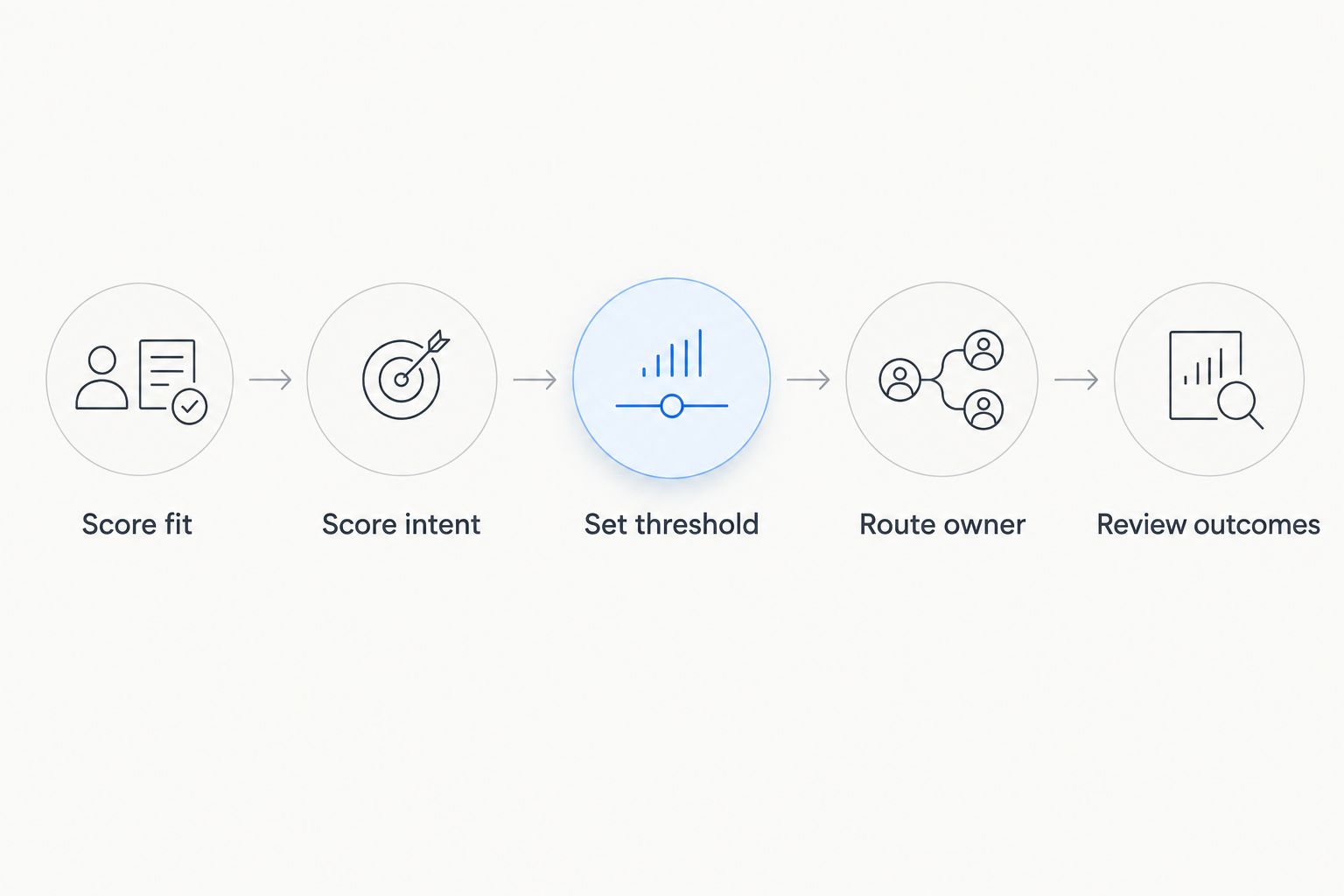
HubSpot scoring can reflect fit, engagement, or both. Choose the model that matches the handoff you just defined, then give each rule a reason to exist. For this workflow, the sequence is Score fit, Score intent, Set threshold, Route owner, and Review outcomes; each stage depends on the one before it.
| Scoring approach | Best for | Advantage | Limitation |
|---|---|---|---|
| Fit score | Teams with reliable buyer-profile fields | Keeps the target buyer visible | Does not show whether the buyer is ready to talk |
| Engagement score | Teams with meaningful tracked actions | Captures recent interest | Can elevate an interested contact who is not a buyer |
| Combined score | Teams that need both checks before handoff | Puts fit and intent in the same review | Needs clear rules so activity does not mask poor fit |
- Open Lead Scoring in HubSpot and select Create score. Choose a contact score, then select the fit, engagement, or combined approach that matches your written qualification rule. If your account does not show the required option, stop here and confirm access rather than building a workflow around a property you cannot update.
- Add fit criteria using contact fields whose values you have checked. For an initial model, assign 10 points to a reliable fit signal and 0 points to an unknown value. These are example weights for your team to test, not a universal definition of lead quality.
- Add engagement criteria for actions that show stronger interest. For example, give a direct request to speak with your team 20 points and a lower-intent action 10 points. Confirm that each action is tracked on the contact record before you depend on it.
- Review the score's limits and exclusions before turning it on. If your scoring setup supports time-based rules, decide whether older activity should stop contributing; do not assume that every past action reflects current intent.
- Save the score and inspect test contact records. Verify which rule contributed to each result, including a contact with missing fit data and a contact with strong engagement but no buyer fit.
Expected result: you have a contact score whose inputs you can explain. In 2026, keep the score deliberately small until you can compare its high-scoring contacts with actual sales decisions.
Set the threshold and routing rule
A threshold is a trigger for review, not proof that a deal will close. Pick an initial cutoff only after you have examined test records. If high engagement alone lets a poor-fit contact cross it, change the criteria before sending anyone to sales. Require the fit condition as well as the score when that distinction matters to your handoff.
- Open Workflows in HubSpot and select Create workflow. Use a contact-based workflow. Choose enrollment criteria that match the score threshold and any separate fit or exclusion conditions from your handoff definition.
- Add a guard against duplicate handoffs. Exclude contacts already in an active sales process, or check a handoff status property before the workflow changes it. The aim is one clear review request, not repeated alerts every time activity changes the score.
- Add the ownership action your team uses to route a contact. If assignment depends on region, service line, or another field, check that field for empty values and define where unassigned contacts go.
- Update the handoff status and add a notification or task for the owner, using the actions available in your account. Include the contact, the reason for qualification, and the action you expect sales to take. Set an internal goal of 1 business day for a first review if your team can staff it; that is an operating target, not a HubSpot setting.
- Use the workflow's test function with contacts that should qualify, should fail the fit check, and should be excluded. Then review the workflow and turn it on. Check the first enrolled contacts against the written handoff definition.
Expected result: an eligible contact crosses the threshold, reaches the right owner, and carries a visible status. An ineligible or already-owned contact does not generate another handoff. The workflow is ready for sales review, not unattended expansion.
Route contacts when their score changes
The first workflow handles a new handoff. A second, adjacent workflow handles a contact whose score changes after that handoff: interest can rise, fall, or come from a contact sales has already reviewed. Do not simply reenroll every high-scoring contact in the original workflow; that creates repeat assignments without adding context.
- Create a separate contact-based workflow for records whose score or relevant status changes. Define the specific change that merits another review, such as a previously rejected contact showing a new high-intent action.
- Check the current owner and handoff status before sending a notification. Keep the existing owner when the contact is already being worked unless your team has approved a different rule.
- Make the notification explain what changed. A new request to speak with your team is more useful than a message saying only that a score increased.
- Test a record that should trigger the update and one that should not. Review whether reenrollment settings match the behavior you want before you turn on the second workflow.
Expected result: sales hears about a meaningful change without receiving the same lead as a fresh assignment. In 2026, this distinction keeps your new-lead handoff separate from follow-up on contacts already in the pipeline.
Troubleshoot the handoff
- A contact has no score. Check that the score is active, the record is the object type you chose, and the underlying fields or tracked actions exist on that contact. A blank field cannot satisfy a fit rule built on a known value.
- A poor-fit contact qualifies. Inspect the rules contributing points. Reduce the weight of broad activity or add an explicit fit condition to workflow enrollment; raising the threshold alone can also block good-fit contacts.
- A qualified contact never enters the workflow. Compare the contact's score and other fields with every enrollment condition, including exclusions. Test that record in the workflow before changing the scoring model.
- Sales receives repeat notifications. Check reenrollment, existing-owner conditions, and handoff status. Route score changes through the update workflow rather than treating each change as a new lead.
- The assigned owner cannot act. Check that the contact has the details sales requires and that the ownership rule has a path for empty routing fields. Send incomplete records for review instead of presenting them as ready conversations.
Fix the failed rule at its source. In 2026, a high score with no usable context is a data or handoff problem, not a reason to add more points.
Customize your workflow
Once contacts are reaching the right owner, inspect what happens after the notification. Review a 30-day group of handed-off contacts with sales: which were accepted, which were rejected, and why? Use those decisions to revise one rule at a time. The period is a practical review window for this workflow, not a claim about how quickly lead quality becomes clear.
Ask sales to record a reason when it rejects a contact. A rejection for poor fit points to the fit criteria; a rejection for weak intent points to the engagement criteria; a missing owner points to routing. Keeping those reasons distinct stops the team from repeatedly changing a threshold when the problem sits elsewhere.
Prospekt's agency model is a fit when a B2B or B2C team wants brand strategy, digital marketing, and creative services considered alongside growth work. Its limit here is equally clear: an agency cannot define your sales team's acceptance rule without that team's input. Keep sales accountable for the handoff definition and use the workflow to make it observable.
FAQ
What is a hubspot lead scoring workflow?
A hubspot lead scoring workflow uses contact fit and engagement signals to trigger a defined sales handoff. The handoff needs an owner, an exclusion rule, and a way to record the sales decision.
Should I use fit scoring or engagement scoring?
Use fit scoring to identify plausible buyers and engagement scoring to identify relevant interest. If sales needs both before outreach, check both conditions rather than relying on activity alone.
How do I choose a HubSpot lead score threshold?
Choose the threshold by checking test contacts against your written qualification rule. Adjust the contributing criteria if poor-fit contacts qualify; a higher number alone does not fix a weak model.
Can HubSpot route a contact when its score changes?
A contact-based workflow can use scoring conditions to start a handoff or follow-up. Check enrollment and reenrollment rules so an updated score does not create duplicate sales notifications.
Why is a contact missing from the lead scoring workflow?
Check the score, every enrollment condition, and every exclusion on that contact. Missing fit data or an existing handoff status can prevent enrollment even when other signals are present.
What should sales receive with a scored lead?
Sales should receive an assigned contact, the reason the contact qualified, and a clear next action. A score without context forces the owner to repeat the qualification work.
How often should I review lead scoring rules in 2026?
Review the rules when you have a useful group of accepted and rejected handoffs. A 30-day review window is a starting operating choice; sales feedback determines which rules need changing.
One last thing
Test the rejected contacts, not just the contacts sales accepted. In 2026, a rejection reason tells you whether to fix buyer fit, intent, missing data, or routing. Prospekt can support the wider growth marketing work; the clearest signal for this workflow still comes from the sales decision recorded after each handoff.
Related guides
- HubSpot alternatives
- How long growth marketing results take
- Growth marketing for B2B SaaS companies
- Demand generation for enterprise SaaS companies


