 Skip to main content Skip to footer

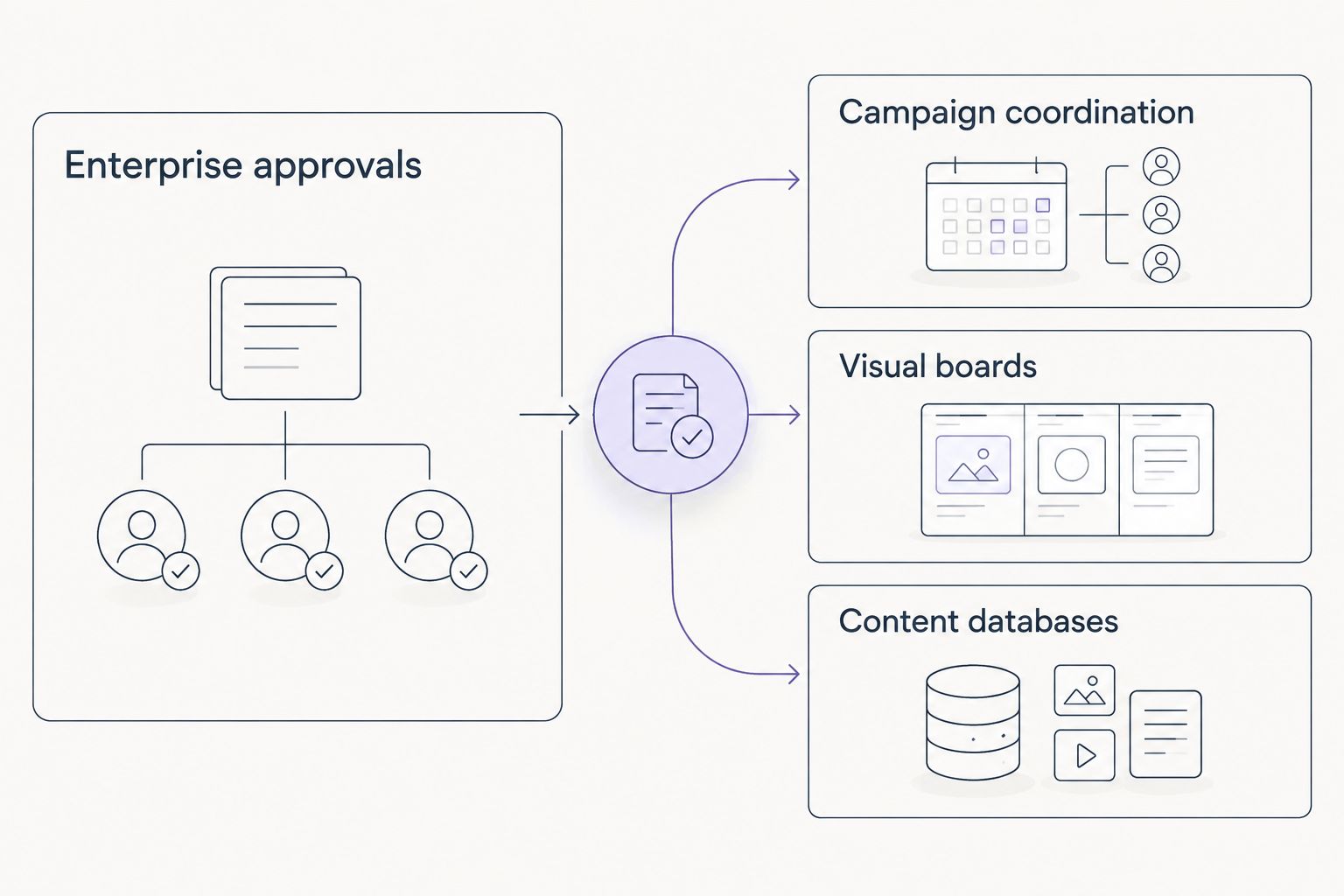
Wrike gives marketing teams request forms, approvals, and resource planning in one place. That depth becomes a burden when a team needs to coordinate campaigns but not administer an enterprise workflow. The best Wrike alternative in 2026 is Asana for campaign coordination; choose Monday.com for visual boards or Airtable for content databases.
- Among Wrike alternatives in 2026, Asana is the best fit for marketing teams that need clear campaign ownership.
- Choose Monday.com for visual campaign boards and Airtable for connected content and asset records.
- Keep Wrike when resource planning and formal creative approvals are central to the work.
- Hey Prospekt is a growth marketing agency, not a Wrike replacement; changing tools does not replace campaign execution.
Why this matters
A marketing team can have every campaign in Wrike and still struggle to answer a basic question: who owns the next decision? Before you switch tools in 2026, separate problems caused by the software from problems caused by an unclear process. A different board will not establish an approval owner, set campaign priorities, or connect creative work to performance reporting.
Hey Prospekt is a full-service growth marketing agency offering brand strategy, digital marketing, and creative services. That is a different purchase from project management software. If you need a better place to track work, compare the tools below. If you need someone to plan and execute the work, evaluate the agency relationship separately.
Wrike alternatives at a glance
| Tool | Best for | Standout capability | How it differs from Wrike |
|---|---|---|---|
| Wrike | Teams with formal approvals and shared resources | Enterprise approvals | The benchmark: detailed controls, with more setup to manage |
| Asana | Cross-functional campaign teams | Campaign coordination | Emphasizes accessible task and portfolio views |
| Monday.com | Teams organizing work visually | Visual boards | Builds workflows around customizable boards |
| ClickUp | Teams consolidating work and documentation | Tasks and docs | Offers a broad workspace that needs clear setup rules |
| Smartsheet | Spreadsheet-oriented marketing operations | Grid-based reporting | Starts from rows, columns, and dashboards |
| Airtable | Content calendars and connected records | Content databases | Treats campaigns and assets as records rather than only tasks |
The table is a fit guide, not a feature-count contest. In 2026, start with the work your team cannot afford to lose: approval history, campaign ownership, reporting inputs, or relationships between content and assets. Then test that work in a prospective tool before migrating everything.
1. Asana: best for cross-functional campaign coordination
Asana is the first Wrike alternative to assess if your marketing work crosses content, design, paid media, and leadership review. Tasks have owners and due dates; project views let people follow the same work without requiring everyone to use the same layout. Portfolios help a lead see multiple projects together.
Where Asana shines
- List, board, calendar, and timeline views give different contributors a way into the same project.
- Task ownership makes handoffs easier to identify when a campaign stalls.
- Portfolio views help a marketing lead check work across campaigns rather than open each project individually.
Where Asana falls short
- A team with intricate resource-allocation rules must check whether Asana's workload setup covers them before leaving Wrike.
- Creative approval requirements need a practical test using a real asset and its actual reviewers, not a demo task.
- Moving tasks alone will not preserve an unclear approval process; you must decide who signs off.
Best for: marketing teams that value visible ownership across several campaigns more than detailed enterprise administration.
| Decision point | Wrike | Asana |
|---|---|---|
| Primary organizing unit | Projects and tasks within configurable workflows | Projects, tasks, and portfolios |
| Campaign overview | Dashboards and project views | Project views and portfolios |
| Approval test | Check existing proofing and approvals | Test the asset review process your team needs |
Do not migrate on the strength of an attractive timeline. Put a live campaign through assignment, review, revision, and final approval. Verdict: Buy if Asana makes those handoffs clear without removing a Wrike control you rely on.
2. Monday.com: best for visual campaign boards
Monday.com is built around customizable boards. A marketing team can use them to show campaign stages, owners, and status in a format stakeholders can scan. That makes it a strong candidate when your main complaint about Wrike is how much effort it takes to see what is moving and what is blocked.
Where Monday.com shines
- Board views make status and ownership visible without opening each task.
- Forms can collect incoming requests into a workflow rather than leaving them in an inbox.
- Automations can handle routine status changes and notifications once the team agrees on its process.
Where Monday.com falls short
- Easy customization can produce different status labels and board structures for the same kind of campaign.
- A visual board does not, by itself, establish who has authority to approve creative work.
- Teams with complex resource dependencies should validate those needs against an actual Wrike project.
Best for: teams that want campaign progress and requests displayed in a visual workflow.
| Decision point | Wrike | Monday.com |
|---|---|---|
| Main workspace view | Configurable project and task views | Customizable boards |
| Request intake | Request forms | Forms feeding boards |
| Governance question | Which controls must stay? | Who keeps board structures consistent? |
Create a board from an existing campaign, not an idealized template. Include the messy work: changed briefs, overdue reviews, and requests arriving midstream. Verdict: Buy if the board clarifies those handoffs and the team can maintain a consistent structure.
3. ClickUp: best for consolidating tasks and documentation
ClickUp puts tasks and documents in the same workspace. It also offers multiple work views, so a team can organize campaigns without maintaining a separate document for every working brief. The breadth is useful when scattered task and planning tools are the problem; it is less useful when the team already struggles to agree on a workflow.
Where ClickUp shines
- Tasks and documents can live together, keeping a working brief close to the assigned work.
- Different views let contributors inspect the same campaign through a list, board, or timeline.
- Custom fields support teams that need to track campaign details beyond a basic task status.
Where ClickUp falls short
- The number of setup choices calls for someone to define naming, fields, and project structure.
- Combining documents and tasks in one tool does not guarantee that contributors will keep either current.
- Teams focused mainly on approvals should compare that workflow directly with what they already have in Wrike.
Best for: marketing teams deliberately consolidating task tracking and working documents.
| Decision point | Wrike | ClickUp |
|---|---|---|
| Working briefs | Test how briefs fit the current workspace | Docs alongside tasks |
| View options | Multiple project and task views | Multiple task views |
| Setup risk | Workflow configuration | Too many fields and conventions |
Set rules for where briefs live and who maintains them before transferring a campaign. Verdict: Hold until the team can explain how it will use ClickUp's added flexibility.
4. Smartsheet: best for spreadsheet-oriented operations
Smartsheet starts from a grid that will feel familiar to people managing campaign schedules, budgets, or reporting inputs in spreadsheets. It can display project information through other views and dashboards, but the grid remains a useful way to judge fit. If your marketing operations team thinks in rows and columns, test it against Wrike.
Where Smartsheet shines
- Grid-based work is familiar to stakeholders who already maintain structured campaign trackers.
- Dashboards can present information from underlying work to people who need a summary.
- Forms provide a way to collect consistent inputs for recurring requests.
Where Smartsheet falls short
- A grid is not necessarily the easiest place for designers or writers to discuss revisions.
- A dashboard reflects the quality of the underlying updates; it cannot correct stale ownership.
- Teams relying on Wrike's creative review process must test the equivalent workflow rather than assume a spreadsheet will cover it.
Best for: marketing operations teams whose schedules and reporting already revolve around structured records.
| Decision point | Wrike | Smartsheet |
|---|---|---|
| Starting point | Configurable work management | Spreadsheet-style grid |
| Stakeholder summary | Dashboards | Dashboards |
| Critical test | Existing approval workflow | Revision and approval handoffs |
Build a campaign tracker with the fields leadership actually reads, then ask contributors to update it. Verdict: Buy if the grid makes reporting easier without turning creative review into an email chain.
5. Airtable: best for content and campaign databases
Airtable deserves a look when the hard part is connecting a content calendar to campaigns, channels, and assets. Its database approach lets teams organize related records and show them in different views. Wrike remains the more direct choice if the primary job is coordinating task dependencies and formal reviews.
Where Airtable shines
- Linked records help connect work that belongs together without repeating every detail in a task description.
- Calendar and other views let different teams work from the same underlying records.
- Forms can capture information consistently before it enters a content or campaign database.
Where Airtable falls short
- A well-organized asset database is not a complete task or approval workflow.
- Teams must design record relationships and maintain the information those relationships depend on.
- Moving from Wrike requires a specific plan for task ownership, revisions, and sign-off.
Best for: content-heavy teams whose biggest friction is organizing related campaign information.
| Decision point | Wrike | Airtable |
|---|---|---|
| Core structure | Projects and tasks | Tables and linked records |
| Content planning | Project and calendar views | Connected records and calendar views |
| Critical test | Task and approval history | Ownership and sign-off process |
Start with one real campaign and its associated content. If the linked records clarify planning but approvals become harder to follow, retain a dedicated task workflow. Verdict: Buy for connected content planning; hold if the database would become your only approval system.
Why marketing teams switch from Wrike
There is no universal reason to leave Wrike in 2026. The decision follows the work a team performs every week:
- Campaign status takes too much effort to explain. Test Asana's portfolio and project views or a Monday.com board with the same live campaign. Choose the view that exposes ownership and blockers without a separate status document.
- Briefs and tasks have become disconnected. Test ClickUp with a real working brief. Decide who owns updates before treating consolidation as a solution.
- Reporting inputs still live in spreadsheets. Test whether Smartsheet's grid gives contributors a clearer place to maintain them.
- Content and assets have lost their relationships. Test Airtable with a campaign, its content, and its channels. A database helps only if the team maintains the records.
These are reasons to run a comparison, not claims that Wrike cannot do the work. In 2026, make the candidate tool reproduce the workflow you would lose: intake, ownership, review, reporting, and any resource planning that matters to the team.
When staying with Wrike is the right call
Keep Wrike if its request intake, approval history, and resource planning already support the people using them. A migration creates work of its own: someone must transfer active projects, explain the new process, and verify that reviewers can still find what needs a decision.
Stay especially cautious when marketing shares workflows with other departments. A board that looks simpler to the campaign team can be less useful to the people approving or allocating its work. The right 2026 test includes those people, not just the marketing lead.
Software is not a growth marketing partner
A project manager records the work. It does not decide which audience to pursue, create a campaign, or assess whether the campaign worked. Hey Prospekt is a growth marketing agency, so compare it with other service partners when execution or strategy is the gap; compare Wrike with Asana and the other tools when coordination is the gap.
The distinction matters because Hey Prospekt's supplied project summaries describe campaign outcomes, not software-migration outcomes. Its Russell Westbrook Enterprises web project reported a 380% lift in mobile engagement and 2.3x B2B inquiries. Its Window Guard project reported 426 new leads and a 10x revenue increase in five months across paid social, website and catalog work, and local SEO. Those figures do not establish that changing a project management tool produces the same results.
If measurement is part of your campaign process, document it alongside task ownership. The Google Analytics to CRO testing pipeline guide covers a related measurement workflow; it is not a substitute for deciding who owns campaign approvals.
Discuss your growth marketing work
Separate campaign execution needs from project management needs.
FAQ
What is the best Wrike alternative for marketing teams in 2026?
Asana is the best first comparison for marketing teams that need clear campaign ownership across functions. Test a real approval workflow before replacing Wrike.
Is Asana better than Wrike for marketing campaigns?
Asana is the better fit when project visibility and task ownership are the priority. Wrike remains a strong choice when the team depends on its established approval and resource-planning processes.
Is Monday.com a good Wrike alternative for creative teams?
Monday.com is a good candidate when a visual board helps creative teams see requests, owners, and status. Test revisions and final sign-off before moving an existing approval workflow.
Can ClickUp replace Wrike and a separate document tool?
ClickUp offers tasks and documents in one workspace. Decide how briefs will be maintained and test approvals before consolidating tools.
Should a marketing team use Smartsheet instead of Wrike?
Use Smartsheet when spreadsheet-style tracking and structured reporting match the team’s daily work. Keep Wrike if its existing approval process is more important than a grid-based workflow.
Is Airtable better than Wrike for a content calendar?
Airtable is a strong choice for a calendar connected to campaign and asset records. Wrike is the more direct choice when task coordination and approvals drive the work.
Can a growth marketing agency replace Wrike?
No. Hey Prospekt is a growth marketing agency, not a project management platform. Choose an agency for strategy or execution and choose software for coordinating the work.
One last thing
Before choosing among Wrike alternatives in 2026, write down the approval step your team is least willing to lose. Rebuild that step in the candidate tool with the people who actually use it. If ownership or sign-off becomes less clear, a cleaner-looking board is not an improvement.
Related guides


