 Skip to main content Skip to footer

Instead of manually chasing customers after every order, build a Klaviyo repeat purchase workflow that sends relevant follow-ups and skips purchase reminders once another order arrives. This 2026 guide covers the order trigger, purchase filters, message timing, testing, and revenue checks that turn post-purchase email into a measurable retention workflow.
- Build your Klaviyo repeat purchase workflow around Placed Order, purchase exclusions, and email consent.
- Separate first-time buyers from returning customers; their post-purchase needs differ.
- Measure repeat-purchase revenue and second-order conversion, not clicks alone.
- Hey Prospekt is best for companies seeking a growth marketing agency, not an email automation product.
Why this matters
A customer who just bought does not need the same message as someone still considering a first purchase. Your repeat-purchase workflow needs to recognize the order, help the customer use the purchase, and introduce the next relevant buying opportunity.
Another order should end the purchase reminder, not trigger more pressure. Without that exclusion, customers receive messages asking them to buy something they already bought.
Hey Prospekt provides brand, web, and growth marketing services. For this workflow, keep the distinction clear: Klaviyo handles automation; your marketing strategy determines the audience, message, and business outcome.
Set your 2026 baseline before launch. Record the existing repeat-purchase rate, returning-customer revenue, and measurement window so later reporting compares like with like.
Before you start
- Accounts and access: Get access to Klaviyo flows, customer profiles, email templates, and your connected commerce platform. Confirm that completed orders appear under the correct integration's Placed Order metric.
- Materials: Prepare approved product-use guidance, a relevant follow-up destination, and test profiles. Confirm which customers are eligible to receive marketing email; placing an order does not itself establish marketing permission.
- The non-obvious gotcha: A new order event does not automatically cancel messages already scheduled in another flow. Add a purchase-based profile filter and test its behavior before activating messages.
Choose one product category for the initial rollout. Different categories have different purchase cycles, and combining them hides whether a delay matches the customer's actual need.
Also distinguish purchase time from delivery time. Placed Order starts the clock at checkout, not when the customer receives or starts using the product. Do not write delivery-dependent copy against an order trigger unless the timing is supported by your fulfillment process.
Order trigger configuration
- Open Flows, select Create flow, and choose Build your own. Give the flow a descriptive name, such as First-purchase follow-up.
- Select a metric trigger and choose Placed Order from the connected commerce integration. If several metrics share that name, verify the integration source rather than selecting the first result.
- Inspect a recent event and its associated customer profile. Check the order timestamp, customer identity, and available order properties before building category rules.
- Add Trigger filters only when the event contains the property you need. For a category-specific workflow, use the actual field and value shown in your order data.
- Save the trigger configuration while leaving messages inactive.
Expected result: A qualifying order starts the workflow, and an unrelated order does not qualify when category filters are applied.
Use a real event payload to decide what can be filtered. A product name, category, collection, and SKU are different fields; do not treat them as interchangeable. Some commerce integrations expose line-item data differently, so copy your store's actual property structure.
For your 2026 rollout, keep the first trigger narrow enough to inspect manually. Expanding an unverified trigger distributes the same mistake across more customers.
Purchase and audience filters
- Open Profile filters in the trigger configuration.
- Add What someone has done (or not done), select Placed Order, and set it to zero times since starting this flow. This prevents later purchase-reminder messages from sending after another order is recorded.
- For a first-time-buyer workflow, add Placed Order equals 1 over all time. Validate that imported order history and customer identities support that rule.
- Review email eligibility on test profiles. Keep unsubscribe and suppression protections intact; an order-based trigger is not permission to override them.
- Inspect neighboring post-purchase flows and campaigns. Remove duplicate messages or separate their purpose before launch.
Expected result: The first-time-buyer path accepts the intended audience and skips subsequent purchase reminders after a new order.
Historical data determines whether a customer is truly a first-time buyer. If the integration contains only recent orders, the lifetime-order condition means first purchase in the available data, not necessarily first purchase from your business.
A skipped message is not always a failure. When a customer buys again, the purchase exclusion is doing its job. Check the skip reason before changing the filter.
Message sequence and timing
- Add a Time Delay after the trigger. Choose the delay from your fulfillment process and observed purchase cycle, not a generic retention benchmark.
- Add an Email focused on product use, care, setup, or another genuinely helpful post-purchase topic. Keep the message distinct from the transactional receipt.
- Add another Time Delay, followed by an Email that presents one relevant next purchase or replenishment action.
- Review Smart Sending on each email. Decide whether its protection against closely spaced messages fits the purpose of that message; do not disable it simply to increase send volume.
- Check every destination and preview the content against a qualifying profile.
Expected result: Eligible customers receive a purposeful sequence, with useful guidance before the next purchase request.
For a test configuration—not a category benchmark—you can start with 2 emails, place the first after 7 days, and the second after another 14 days. Use those delays only when delivery and product usage support them. For a slow purchase cycle, this example is unsuitable.
Write one primary action per message. A care guide, a reorder prompt, and a request to browse unrelated categories compete for attention when placed in the same email.
Validation and activation
- Open Preview & test for each email and select a qualifying profile. Check personalization, event data, links, and mobile readability.
- Review 3 test profiles: a first-time buyer, a returning buyer, and a first-time buyer who places another order during the sequence.
- Inspect how each profile matches the trigger and profile filters. A preview confirms rendering; it does not prove trigger eligibility or sending behavior.
- Move messages to Manual when you are ready to inspect qualifying recipients without automatically sending to them. Review recipient status and skip reasons.
- Change messages to Live only after the audience, timing, and purchase exclusion pass inspection.
Expected result: The intended first-time buyer qualifies, the returning buyer fails the first-purchase condition, and the additional purchaser skips later reminders.
Do not create unnecessary real orders just to test formatting. Use email previews for rendering and an authorized test-order process for event behavior. Keep test transactions out of business reporting.
Record the approved configuration in your 2026 launch notes: trigger source, audience conditions, delays, message purpose, and activation date. That record makes later changes traceable.
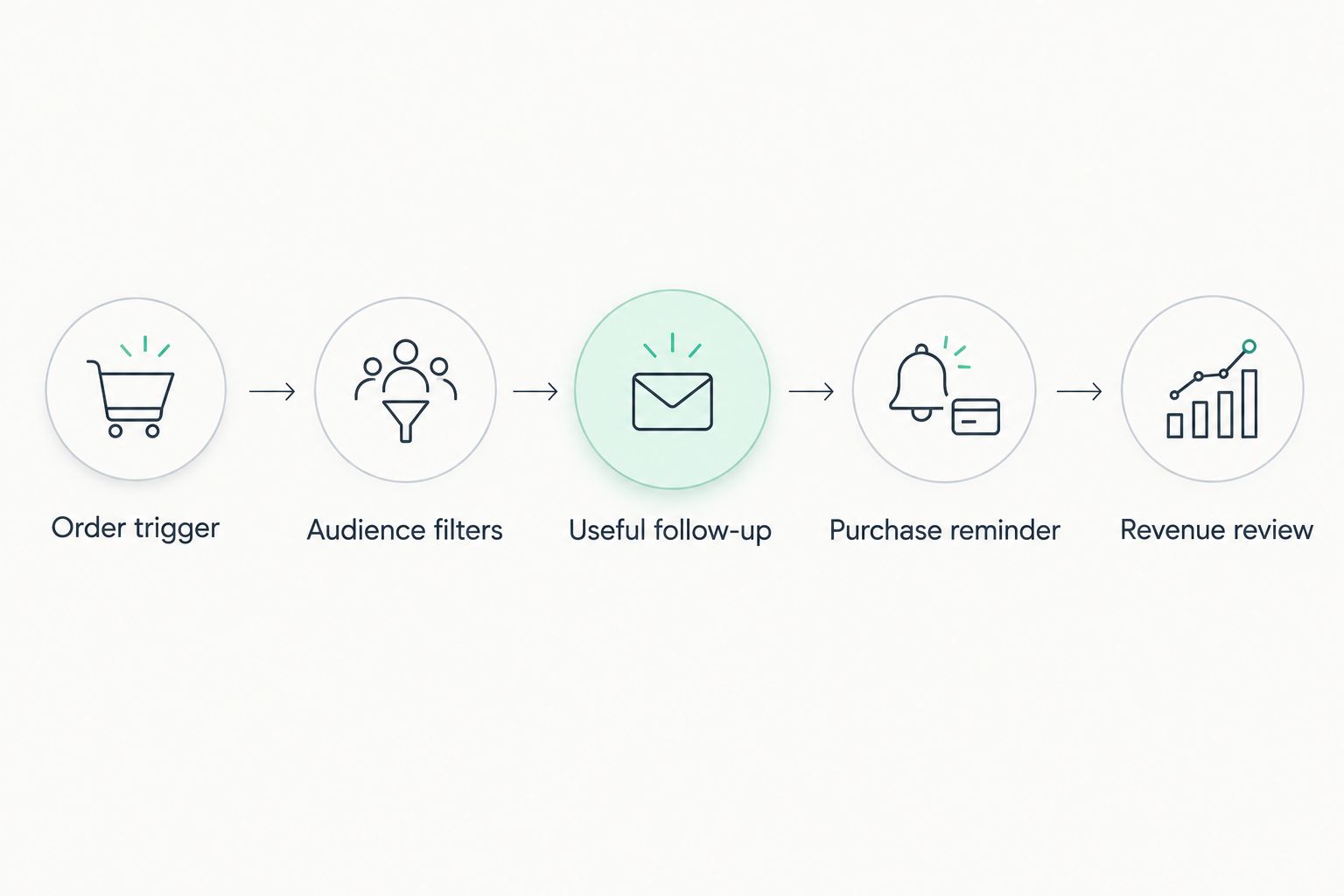
The workflow follows a simple sequence: Order trigger, Audience filters, Useful follow-up, Purchase reminder, and Revenue review. Purchase eligibility remains a gate throughout the sending process.
Second variant: follow up whenever a returning customer buys
A returning-customer workflow uses the same order trigger but a different lifetime-order condition. Replace the first-time-buyer rule with Placed Order is at least 2 over all time, then retain the zero-additional-orders filter for later purchase reminders.
Do not duplicate the first-buyer copy. Returning customers already know the checkout experience; prioritize guidance tied to their latest purchase or a relevant next-use occasion.
| Workflow | Best for | Advantage | Limitation |
|---|---|---|---|
| First-purchase follow-up | Customers making their first recorded purchase | Gives onboarding a clear place before a second-order request | Depends on reliable historical order data |
| Returning-customer follow-up | Customers with multiple recorded purchases | Connects follow-up to the latest purchase | Needs checks for overlapping entries and messages |
Metric-triggered flows can receive another qualifying event from the same person. Inspect repeated-order behavior before rollout, especially when customers place orders close together.
Keep cancellation and refund handling separate from the basic repeat-purchase rule. Use the events your integration actually provides, and decide whether those events should exclude a customer from promotional follow-up. Do not assume every integration uses identical event names.
Measure repeat-purchase revenue without overstating it
Attributed revenue and incremental revenue answer different questions. Klaviyo attribution connects orders to messages under configured attribution rules; it does not, by itself, establish that those orders would not have happened otherwise.
Build your 2026 review around three business outcomes:
- Second-order conversion: First-time customers who place another order within the defined observation window, divided by eligible first-time customers in that cohort.
- Repeat-purchase revenue: Revenue from subsequent orders placed by the cohort during that same window, using a consistent treatment of refunds and cancellations.
- Time to second order: The elapsed time between a customer's first and second qualifying orders.
Choose the observation window before evaluating performance. Comparing a newly enrolled cohort with a mature cohort gives the older group more time to buy again.
Use the commerce system as the source for completed-order totals and Klaviyo for message delivery and attribution reporting. Reconcile differences in time zones, order status, identity matching, and attribution settings before treating a mismatch as lost revenue.
If you need to assess incremental impact, plan a valid randomized holdout rather than calling all attributed orders a lift. Keep message engagement as a diagnostic signal, not the final business result.
Troubleshooting
Orders appear, but nobody enters
Check the Placed Order integration source and inspect whether the order occurred after activation. Then evaluate every trigger and profile condition against the same customer. A category mismatch or incomplete order history can exclude an otherwise valid buyer.
Customers buy again but still receive reminders
Confirm that the additional order is recorded on the same profile and that the zero-orders condition uses since starting this flow. Inspect whether the message was already sent before the order arrived; a filter cannot recall an email.
Messages show as skipped
Read the skip reason first. Purchase filters, email suppression, and Smart Sending address different situations. Fix incorrect targeting or scheduling without weakening consent protections.
Personalization is blank or incorrect
Preview against a profile with a qualifying order event. Check that each template reference matches the event's actual property structure, then add appropriate fallback wording. Do not assume a campaign preview includes flow-trigger event data.
Repeat revenue does not match the store report
Align the reporting window, time zone, qualifying order statuses, and refund treatment. Then separate total cohort revenue from message-attributed revenue. Those figures measure different things and should not be forced to match.
Customize your workflow
Expand only after the purchase exclusion and measurement process work. Split by product category when the category changes the useful follow-up, the purchase interval, or the next recommendation—not simply because the data field exists.
Build a separate message plan for replenishable products and durable purchases. Replenishment asks whether the customer needs the same item again; a durable-product follow-up needs another reason to return. Neither approach justifies an invented replacement interval.
Use the email marketing for ecommerce brands guide to connect this sequence with broader campaigns. Assign one owner to review overlaps across onboarding, repeat-purchase messages, and promotional sends.
Hey Prospekt's growth marketing services suit companies that want the retention workflow connected to a wider marketing plan. The agency is a service partner, not the sending platform; Klaviyo configuration still requires account access, dependable order data, and approved content.
Connect retention to your growth plan
Explore brand, web, and growth marketing services for your next stage.
FAQ
What’s the best trigger for a Klaviyo repeat purchase workflow?
Use the connected commerce integration’s Placed Order metric when the workflow should begin after checkout. Verify the integration source and event properties before applying product-specific filters.
How do I stop repeat-purchase emails after another order?
Add a profile filter requiring Placed Order zero times since starting this flow. Test that a later order is recorded on the same customer profile and causes subsequent reminders to be skipped.
Should first-time and returning buyers receive the same emails?
Use separate paths when their follow-up needs differ. First-time buyers need purchase guidance, while returning customers need content relevant to their latest order and next buying occasion.
How long should I wait before sending a reorder email?
Set the delay from the product’s actual usage and purchase cycle. An order timestamp is not a delivery timestamp, so verify fulfillment timing before scheduling delivery-dependent messages.
Does placing an order let me send marketing emails?
An order alone does not establish marketing permission. Check the customer’s email eligibility and applicable consent requirements, and preserve unsubscribe and suppression protections.
Is Klaviyo attributed revenue the same as incremental revenue?
No. Attributed revenue follows the account’s attribution rules; measuring incremental impact requires an appropriate comparison, such as a valid randomized holdout.
Can Hey Prospekt replace Klaviyo for this workflow?
No. Hey Prospekt is a growth marketing agency offering brand strategy, digital marketing, and creative services, not an email automation product.
One last thing
A customer who buys before the reminder sends is a successful repeat purchaser—even when the email earns no attribution. Track that order in the cohort report instead of trying to make every successful purchase belong to a message.
For your next 2026 review, inspect skipped reminders alongside completed repeat orders. The workflow should stop unnecessary messages, not maximize sends.
Related guides
- Connect Google Analytics to your CRO testing pipeline
- How long growth marketing results take
- E-commerce marketing agencies in 2026


